> ## Documentation Index
> Fetch the complete documentation index at: https://smartcar.com/docs/llms.txt
> Use this file to discover all available pages before exploring further.
# Subscribing Vehicles
> Learn how to subscribe and unsubscribe vehicles to webhooks using auto-enrollment, the Dashboard, or the API
Once you've [created a webhook](/integrations/webhooks/creating-webhooks), you need to subscribe vehicles to it before they'll start receiving data. Smartcar offers three methods to manage vehicle subscriptions: automatic enrollment, Dashboard management, and programmatic API control.
Data will only be sent after your webhook has been verified. See [Callback Verification](/integrations/webhooks/callback-verification) for details.
***
## Subscription Methods
Automatic subscription for all connected vehicles
Manual subscription through the Smartcar Dashboard
Programmatic subscription via REST API
***
## Method 1: Auto-Enrollment (Recommended for Production)
The simplest way to manage subscriptions is to enable auto-enrollment when creating your webhook. This automatically subscribes all vehicles connected to your application.
**All vehicles will be subscribed immediately.** When you enable auto-enrollment, all currently connected vehicles will be subscribed to the webhook right away. Only enable this feature when you're ready to receive data for all vehicles in your application.
### How It Works
When auto-enrollment is enabled:
* **Existing vehicles** are immediately subscribed to the webhook
* **New connections** are automatically subscribed when users connect vehicles
* **No manual management** required for individual vehicles
### Enable Auto-Enrollment
Go to the [Smartcar Dashboard](https://dashboard.smartcar.com/integrations) and create or edit a webhook
Check the "Automatically subscribe all vehicles" option during webhook creation
Complete webhook creation - all vehicles will be subscribed automatically
**Best for:** Production deployments where all connected vehicles should receive webhook data
***
## Method 2: Dashboard Management
For selective subscription, you can manually subscribe individual vehicles through the Dashboard.
### Subscribe via Dashboard
Navigate to [Vehicles](https://dashboard.smartcar.com/vehicles) in the Dashboard
Click on the vehicle you want to subscribe
In the vehicle details, find the "Webhook Subscriptions" section
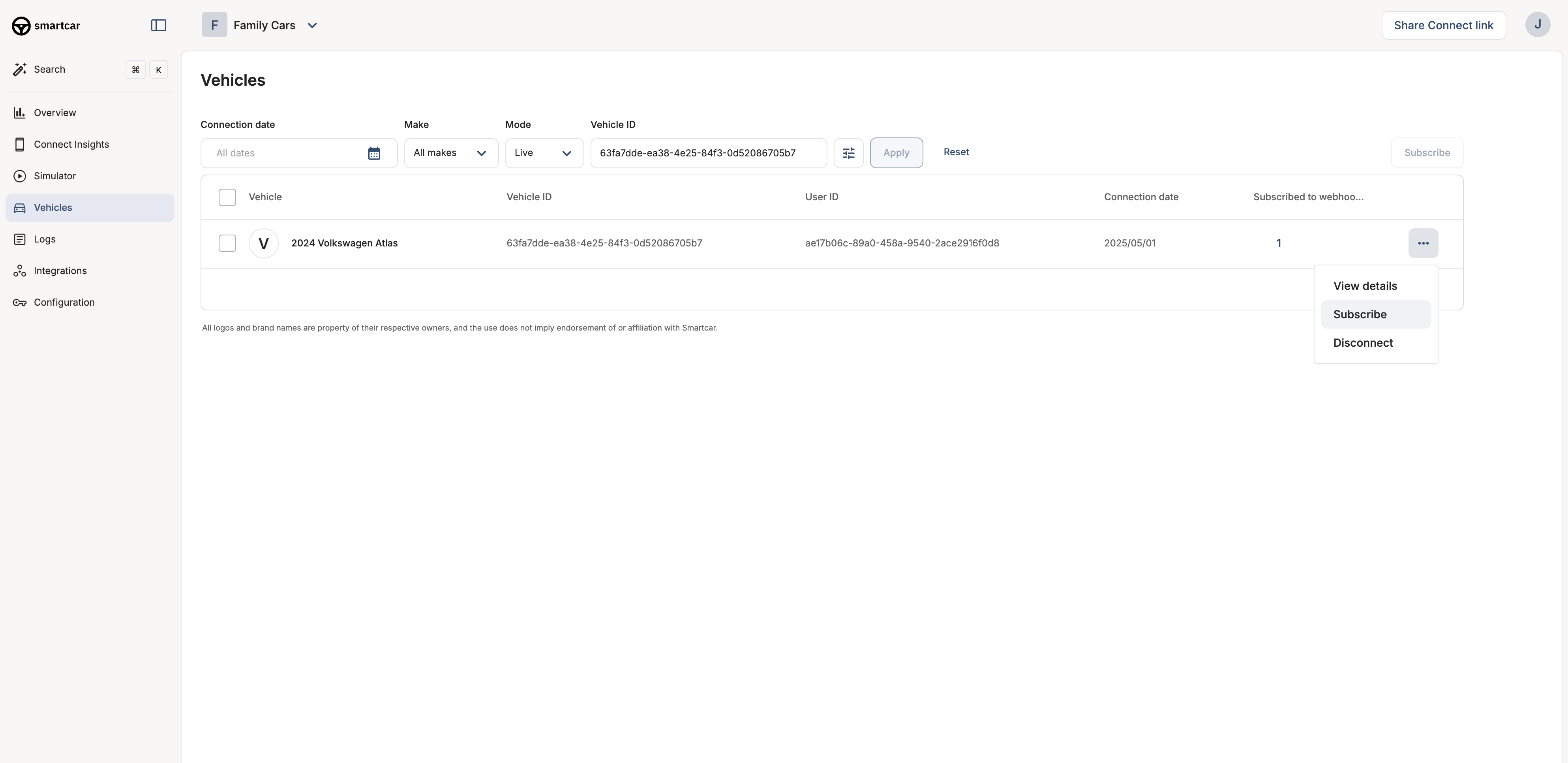 Click "Subscribe" to add the vehicle to a webhook, or "Unsubscribe" to remove it
**Best for:** Testing and development, selective vehicle management, or gradual rollouts
***
## Method 3: API Subscription
For programmatic control, use the subscribe and unsubscribe API endpoints.
* [Subscribe Endpoint](/api-reference/webhooks/subscribe-webhook) - Full API reference for subscribing vehicles
* [Unsubscribe Endpoint](/api-reference/webhooks/unsubscribe-webhook) - Full API reference for unsubscribing vehicles
**Best for:** Dynamic subscription management, custom business logic, or bulk operations
***
## Common Questions
Yes! You can enable auto-enrollment for most vehicles and use the API or Dashboard for exceptions. However, be aware that auto-enrollment will automatically subscribe new vehicles.
The vehicle immediately stops receiving webhook deliveries. You can re-subscribe at any time, and a new first payload will be sent.
You can view all vehicle subscriptions in the [Dashboard](https://dashboard.smartcar.com/vehicles) or use the [Connections API](/api-reference/list-connections) to programmatically list connections.
No, you can subscribe as many vehicles as are connected to your application. Webhooks scale automatically to handle your fleet size.
Not necessarily. You can use one webhook for all vehicles and handle signal availability differences using the `VEHICLE_ERROR` events for unsupported signals.
***
## Next Steps
Requirements for building your webhook endpoint
Understand all types of available payloads
Learn about retry policies and guarantees
Ensure your endpoint passes Smartcar's verification challenge
Click "Subscribe" to add the vehicle to a webhook, or "Unsubscribe" to remove it
**Best for:** Testing and development, selective vehicle management, or gradual rollouts
***
## Method 3: API Subscription
For programmatic control, use the subscribe and unsubscribe API endpoints.
* [Subscribe Endpoint](/api-reference/webhooks/subscribe-webhook) - Full API reference for subscribing vehicles
* [Unsubscribe Endpoint](/api-reference/webhooks/unsubscribe-webhook) - Full API reference for unsubscribing vehicles
**Best for:** Dynamic subscription management, custom business logic, or bulk operations
***
## Common Questions
Yes! You can enable auto-enrollment for most vehicles and use the API or Dashboard for exceptions. However, be aware that auto-enrollment will automatically subscribe new vehicles.
The vehicle immediately stops receiving webhook deliveries. You can re-subscribe at any time, and a new first payload will be sent.
You can view all vehicle subscriptions in the [Dashboard](https://dashboard.smartcar.com/vehicles) or use the [Connections API](/api-reference/list-connections) to programmatically list connections.
No, you can subscribe as many vehicles as are connected to your application. Webhooks scale automatically to handle your fleet size.
Not necessarily. You can use one webhook for all vehicles and handle signal availability differences using the `VEHICLE_ERROR` events for unsupported signals.
***
## Next Steps
Requirements for building your webhook endpoint
Understand all types of available payloads
Learn about retry policies and guarantees
Ensure your endpoint passes Smartcar's verification challenge