> ## Documentation Index
> Fetch the complete documentation index at: https://smartcar.com/docs/llms.txt
> Use this file to discover all available pages before exploring further.
# Event Based Webhooks (Deprecated)
> Event Based webhooks can help limit the API calls needed to a vehicle by sending you events registered by the vehicle.
**This webhook type is deprecated.** Event Based webhooks are no longer available for new integrations. See the [Webhooks Overview](/integrations/webhooks/overview) for the current approach to receiving vehicle data via webhooks.
This tutorial is split into four steps:
1. Creating your webhook
2. Verifying your callback URI
3. Confirmation with a test payload
4. Subscribing your first vehicle
Event Based Webhooks are an **Enterprise** feature. Please reach out to our team to get them enabled.
# Prerequisites
For this tutorial it's recommended to have the following in place:
* To receive webhooks you'll need to set up a callback URI on your server.
* To [subscribe](/api-reference/webhooks/subscribe-webhook) a vehicle you'll want to have [Connect](/connect/dashboard-config) set up.
# Creating your first webhook
1. Navigate to the **Webhooks** section of Dashboard and hit **+ Add Webhook**.
2. Next, name your webhook, enter in your callback URI, and select **Event** as the type.
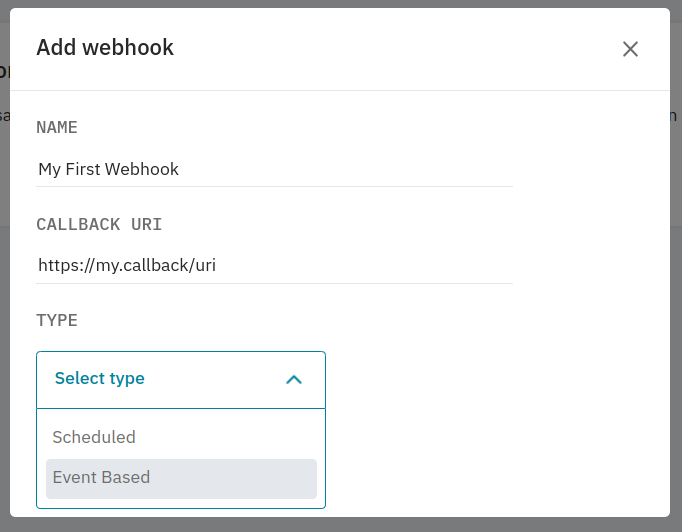 3. After selecting the type, you'll need to select which events you'd like to receive.
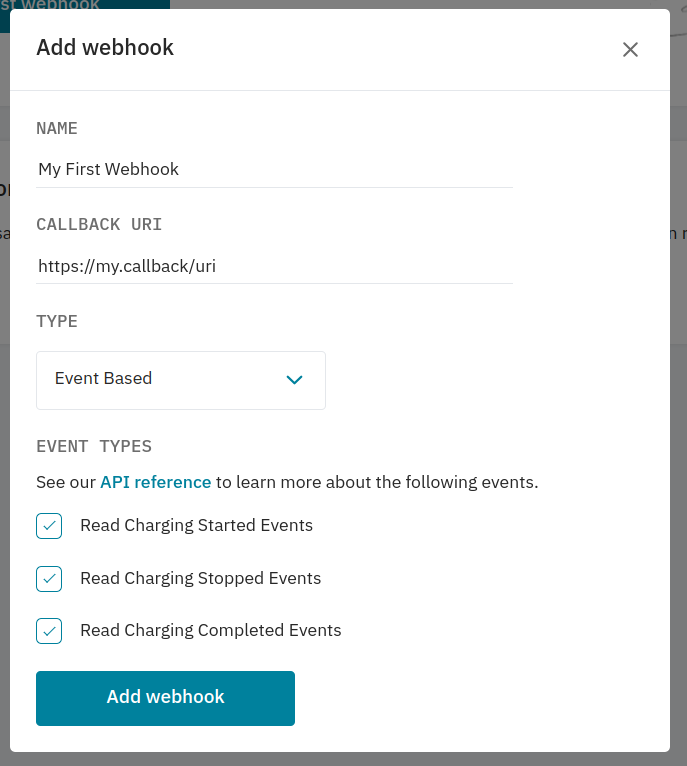 4. Once you're happy with the configuration, hit **Add Webhook** and move on to verifying your callback URI.
# Verifying your callback URI
After adding your webhook, you'll be prompted to verify it. After hitting **Verify this webhook** Smartcar will post a challenge request
to your callback URI to ensure we're sending payloads to the correct place.
4. Once you're happy with the configuration, hit **Add Webhook** and move on to verifying your callback URI.
# Verifying your callback URI
After adding your webhook, you'll be prompted to verify it. After hitting **Verify this webhook** Smartcar will post a challenge request
to your callback URI to ensure we're sending payloads to the correct place.
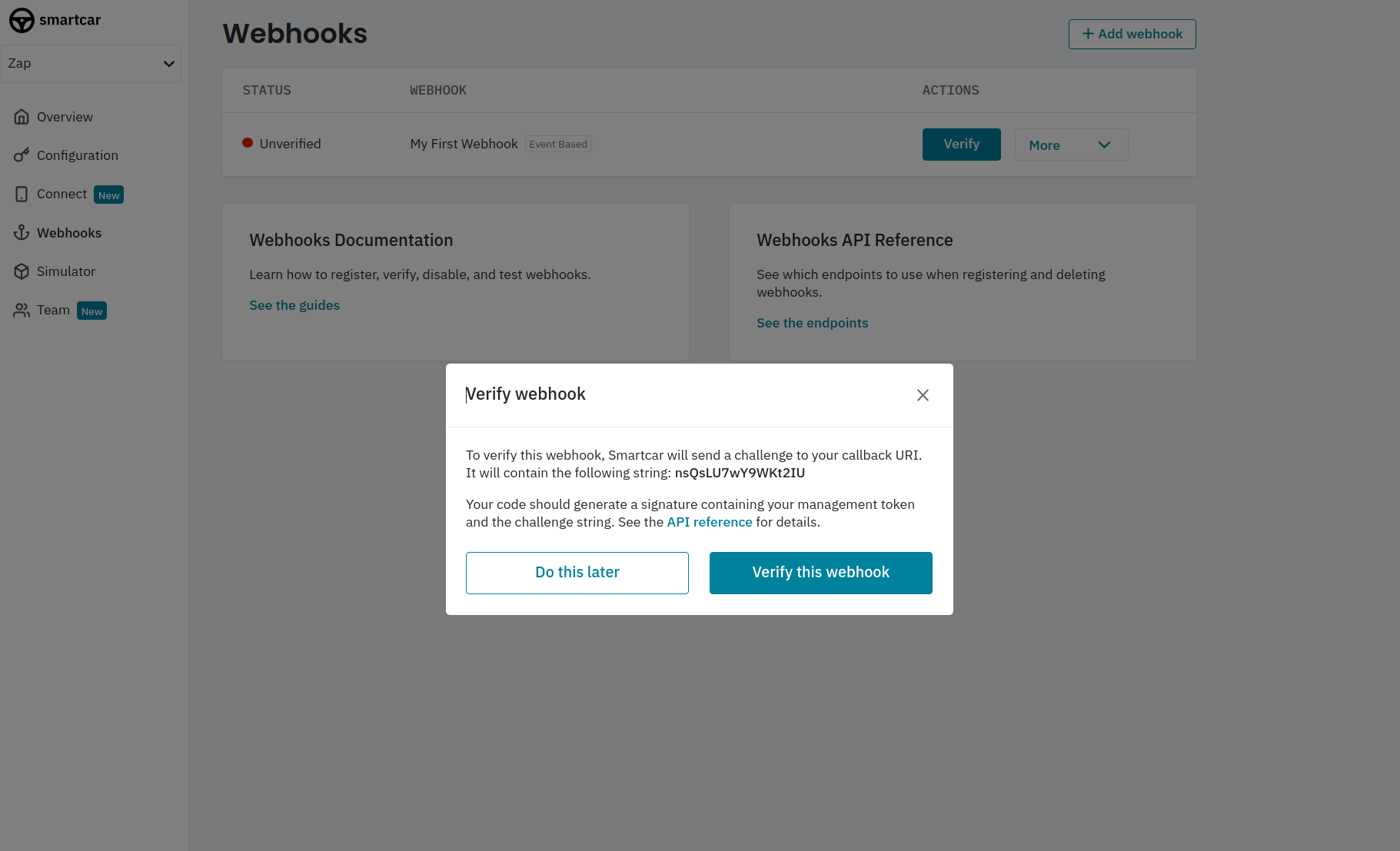 This is a **one-time** event and will be in the following format where the `eventName` will be `verify`
```json verificationRequest.body theme={null}
{
"version": "2.0",
"webhookId": "",
"eventName": "verify",
"payload": { "challenge": "" }
}
```
Upon receiving the request, your server will need respond to the challenge by hashing `payload.challenge` with your `APPLICATION_MANAGEMENT_TOKEN` to create a `SHA-256` based `HMAC`.
You can find your `APPLICATION_MANAGEMENT_TOKEN` in the Configuration section of Dashboard for your application.
Return the hex-encoded hash as the value for `challenge` in your response body with a `2xx status code`.
```json verificationResponse.body theme={null}
{
"status" : 204,
"headers" : {
"Content-Type": "application/json"
},
"body" : {
"challenge" : "{HMAC}"
}
}
```
See the [callback verification](/integrations/webhooks/callback-verification) section on our API Reference for more information.
# Confirmation with a test payload
Once verified you can send a test payload to your callback URI. Payloads from vehicles will have `eventName` set to `eventBased`.
Event Based webhooks are only supported for `live` vehicles.
```json Test Request Body theme={null}
{
"version": "2.0",
"webhookId": "2bc671d0-b712-4cac-8837-50deeb474605",
"eventName": "eventBased",
"mode": "test",
"payload": {
"eventId": "68f4179e-0648-4795-a4d8-0b553c2c635c",
"vehicleId": "00000000-0000-4000-A000-000000000000",
"eventType": "CHARGING_COMPLETED",
"eventTime": "2023-08-24T15:49:24.855Z"
}
}
```
```json Test Request Headers theme={null}
{
"sc-signature": "61e60e2e149ccc0c63680ca3a9df09e071ea450dffc1f0e844f962f9df019b44",
"content-type": "application/json",
"user-agent": "Smartcar-Webhooks/2.0",
}
```
This is a **one-time** event and will be in the following format where the `eventName` will be `verify`
```json verificationRequest.body theme={null}
{
"version": "2.0",
"webhookId": "",
"eventName": "verify",
"payload": { "challenge": "" }
}
```
Upon receiving the request, your server will need respond to the challenge by hashing `payload.challenge` with your `APPLICATION_MANAGEMENT_TOKEN` to create a `SHA-256` based `HMAC`.
You can find your `APPLICATION_MANAGEMENT_TOKEN` in the Configuration section of Dashboard for your application.
Return the hex-encoded hash as the value for `challenge` in your response body with a `2xx status code`.
```json verificationResponse.body theme={null}
{
"status" : 204,
"headers" : {
"Content-Type": "application/json"
},
"body" : {
"challenge" : "{HMAC}"
}
}
```
See the [callback verification](/integrations/webhooks/callback-verification) section on our API Reference for more information.
# Confirmation with a test payload
Once verified you can send a test payload to your callback URI. Payloads from vehicles will have `eventName` set to `eventBased`.
Event Based webhooks are only supported for `live` vehicles.
```json Test Request Body theme={null}
{
"version": "2.0",
"webhookId": "2bc671d0-b712-4cac-8837-50deeb474605",
"eventName": "eventBased",
"mode": "test",
"payload": {
"eventId": "68f4179e-0648-4795-a4d8-0b553c2c635c",
"vehicleId": "00000000-0000-4000-A000-000000000000",
"eventType": "CHARGING_COMPLETED",
"eventTime": "2023-08-24T15:49:24.855Z"
}
}
```
```json Test Request Headers theme={null}
{
"sc-signature": "61e60e2e149ccc0c63680ca3a9df09e071ea450dffc1f0e844f962f9df019b44",
"content-type": "application/json",
"user-agent": "Smartcar-Webhooks/2.0",
}
```
# Subscribing your first vehicle
Now you've got your webhook set up, you can subscribe vehicles to start getting data at your desired frequency.
If you haven't done so already, please set up the [Connect](connect/dashboard-config) for your application.
After receiving your initial `ACCESS_TOKEN` from the [auth code exchange](/api-reference/authorization/auth-code-exchange) step for Connect,
you'll first want to hit the [List Connections](/api-reference/management/get-vehicle-connections) endpoint to fetch the Smartcar
`vehicle_id`s of the authorized vehicles.
With your `ACCESS_TOKEN` and `WEBHOOK_ID` you can hit the [Subscribe](/api-reference/webhooks/subscribe-webhook)
endpoint for each `vehicle_id` to start receiving data.
# FAQs
No, you'll need to set up a webhook for each type. However, you can receive multiple events per event based webhook.
Yes! You can distinguish between webhooks types based on the `eventName` field - `schedule` or `eventBased`.
* Once a webhook is configured, we’ll begin sending events to your Callback URI on the cadence that you’ve chosen.
We’ll expect a 2xx response to each. In the event that we don’t receive a 2xx response, we’ll retry 5 times over the next 10 minutes.
**If we continue not to receive a successful response, we’ll automatically disable your webhook.**
* Check that your server didn't experience down time for more than 10 minutes recently resulting in 2xx responses not being sent back to Smartcar.
* If you haven't made any major changes to your callback URI, commonly our request payload may have hit the request size limit for your server.
This depends on a variety of factors including the make of the vehicle as well as cell service where the vehicle is located at the time of the event.
You can check `payload.timestamp` to see when the event was logged.