> ## Documentation Index
> Fetch the complete documentation index at: https://smartcar.com/docs/llms.txt
> Use this file to discover all available pages before exploring further.
# User Selected Battery Capacity
> This flow can be launched using the URL provided by the [battery capacity](/docs/api-reference/get-nominal-capacity) endpoint.
## Automatic Battery Capacity Selection
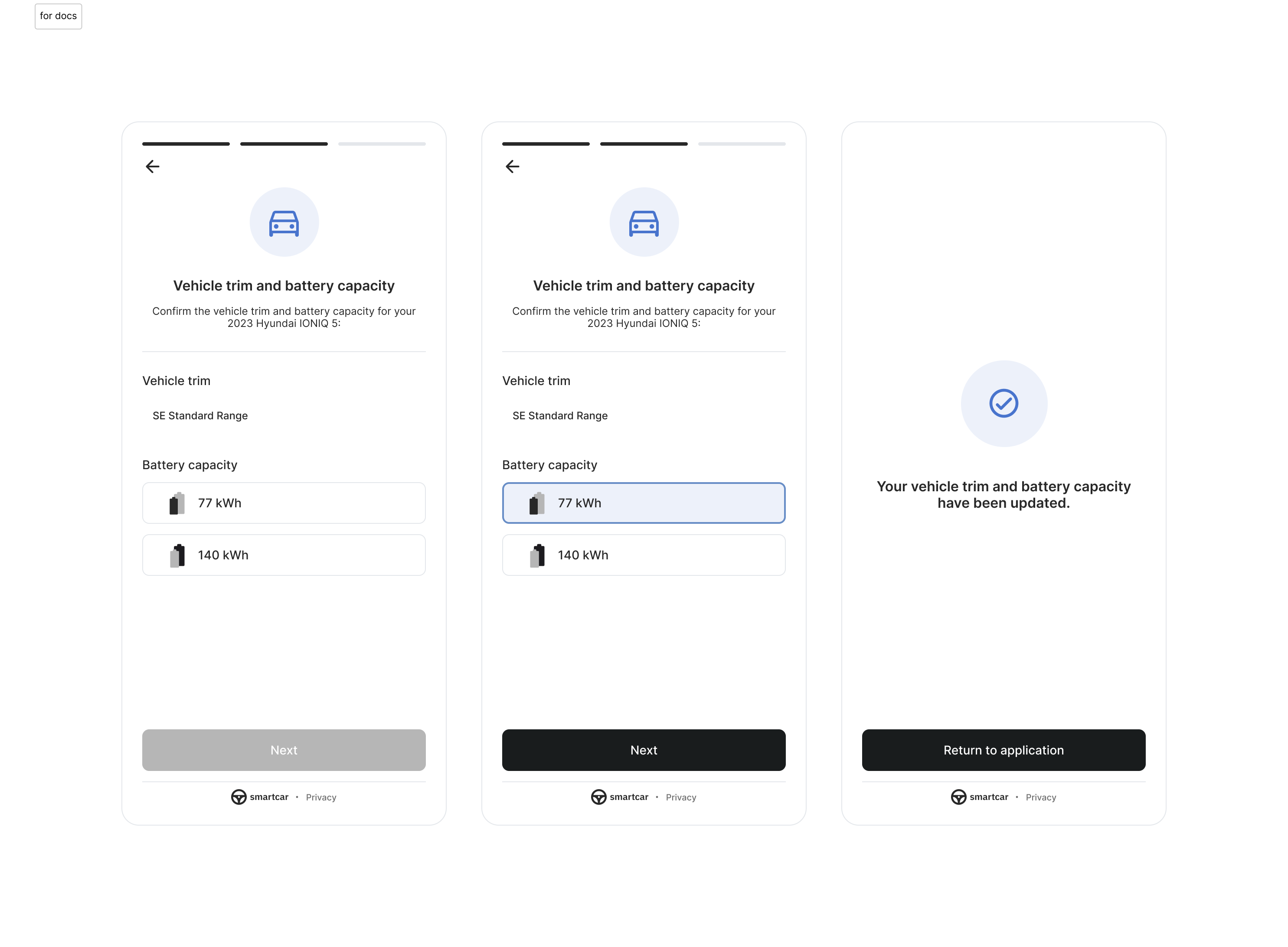
When you request the `read_battery` permission, users will automatically be prompted to select their vehicle's battery capacity during the Smartcar Connect flow if we cannot determine the specific capacity for their vehicle(s). This ensures accurate battery information for your application is readily available.
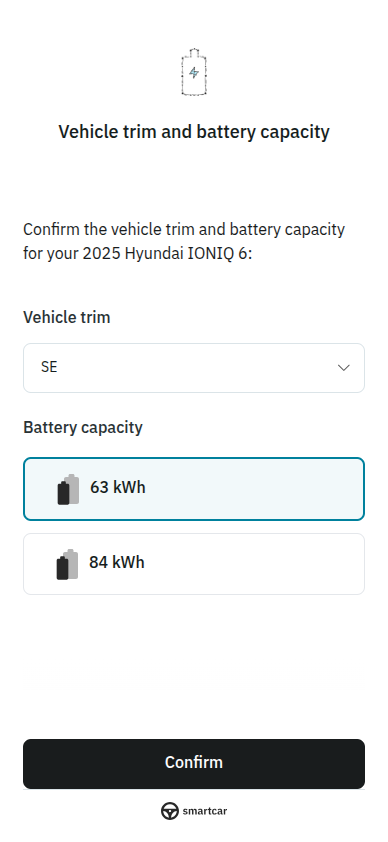 For users that skip the selection prompt or were connected prior to September 18th, 2025, you can still launch the battery capacity selection flow manually using the URL provided by the [GET /battery/nominal\_capacity](/api-reference/get-nominal-capacity) endpoint.
### Append your redirect URI
Smartcar will provide a URL with the following parameters from the [GET
/battery/nominal\_capacity](/api-reference/get-nominal-capacity) endpoint:
```http theme={null}
https://connect.smartcar.com/battery-capacity
?vehicle_id=36ab27d0-fd9d-4455-823a-ce30af709ffc
&client_id=8229df9f-91a0-4ff0-a1ae-a1f38ee24d07
&token=90abecb6-e7ab-4b85-864a-e1c8bf67f2ad
&response_type=vehicle_id
&redirect_uri=
```
The Smartcar vehicle Id.
The `client_id` from the Smartcar Dashboard for your application.
Must be set to `vehicle_id`.
The URI you would like the response sent to after a user exits the
flow.
**NOTE:** this is the only parameter that will **not** be prepopulated as
part of the API response. You **must** append it in order to launch the
flow successfully and receive confirmation the user has exited the flow.
A token to validate that the URL was provided from a [battery capacity](/api-reference/get-nominal-capacity)
response for your application. The token is valid for 30 days. If a token is not provided or is no longer valid,
the user will be directed to re-auth prior to selecting their capacity.
## Response
### Success
After the user selects a capacity and completes the flow, Smartcar will send
the following to your redirect URI:
```http Success theme={null}
https://example.com/home
?vehicle_id=36ab27d0-fd9d-4455-823a-ce30af709ffc
&selected_capacity=80.9
&reason=battery_capacity
```
Upon receiving a success response, you can access the `selected_capacity` by calling the GET
[/battery/nominal\_capacity](/api-reference/get-nominal-capacity) endpoint to
view the selection in the `capacity.nominal` field.
### Error
When you redirect the user to select a battery capacity and they select "I don't know the battery capacity", Smartcar will send the
following to your redirect URI:
```http Error theme={null}
https://example.com/home
?error=battery_capacity_no_selection
&error_description=user did not know battery capacity
&vehicle_id=36ab27d0-fd9d-4455-823a-ce30af709ffc
```
## Flow Example
For users that skip the selection prompt or were connected prior to September 18th, 2025, you can still launch the battery capacity selection flow manually using the URL provided by the [GET /battery/nominal\_capacity](/api-reference/get-nominal-capacity) endpoint.
### Append your redirect URI
Smartcar will provide a URL with the following parameters from the [GET
/battery/nominal\_capacity](/api-reference/get-nominal-capacity) endpoint:
```http theme={null}
https://connect.smartcar.com/battery-capacity
?vehicle_id=36ab27d0-fd9d-4455-823a-ce30af709ffc
&client_id=8229df9f-91a0-4ff0-a1ae-a1f38ee24d07
&token=90abecb6-e7ab-4b85-864a-e1c8bf67f2ad
&response_type=vehicle_id
&redirect_uri=
```
The Smartcar vehicle Id.
The `client_id` from the Smartcar Dashboard for your application.
Must be set to `vehicle_id`.
The URI you would like the response sent to after a user exits the
flow.
**NOTE:** this is the only parameter that will **not** be prepopulated as
part of the API response. You **must** append it in order to launch the
flow successfully and receive confirmation the user has exited the flow.
A token to validate that the URL was provided from a [battery capacity](/api-reference/get-nominal-capacity)
response for your application. The token is valid for 30 days. If a token is not provided or is no longer valid,
the user will be directed to re-auth prior to selecting their capacity.
## Response
### Success
After the user selects a capacity and completes the flow, Smartcar will send
the following to your redirect URI:
```http Success theme={null}
https://example.com/home
?vehicle_id=36ab27d0-fd9d-4455-823a-ce30af709ffc
&selected_capacity=80.9
&reason=battery_capacity
```
Upon receiving a success response, you can access the `selected_capacity` by calling the GET
[/battery/nominal\_capacity](/api-reference/get-nominal-capacity) endpoint to
view the selection in the `capacity.nominal` field.
### Error
When you redirect the user to select a battery capacity and they select "I don't know the battery capacity", Smartcar will send the
following to your redirect URI:
```http Error theme={null}
https://example.com/home
?error=battery_capacity_no_selection
&error_description=user did not know battery capacity
&vehicle_id=36ab27d0-fd9d-4455-823a-ce30af709ffc
```
## Flow Example