> ## Documentation Index
> Fetch the complete documentation index at: https://smartcar.com/docs/llms.txt
> Use this file to discover all available pages before exploring further.
# Latest Releases
> Learn about Smartcar's latest product updates and improvements
[Subscribe to changelog updates](https://sta26.share.hsforms.com/2CCbdweFdSOeE5B58UvjVlw) and receive email notifications for new releases and updates.
## Charge Schedules now available for more makes
You can now create charge schedules for **Nissan**, **Renault**, **Dacia**, **Chrysler**, **Dodge**, **Jeep**, **RAM**, **Fiat**, and **Alfa Romeo** vehicles, in addition to Volvo, Tesla, and Rivian. Charge schedules apply to BEV and PHEV vehicles and require the `control_charge` permission.
Three schedule types are supported. Availability varies by make:
* **Daily**: One charging window that applies every day.
* **Workweek**: A weekday schedule and a separate weekend schedule.
* **Weekly**: A different schedule for each day or specific days of the week.
**Supported makes:**
* **Nissan** (US & Canada): Daily, Workweek, and Weekly
* **Nissan** (Europe): Daily and Workweek
* **Renault and Dacia**: Daily, Workweek, and Weekly
* **Chrysler, Dodge, Jeep, RAM, Fiat, and Alfa Romeo**: Daily, Workweek, and Weekly
For the most up-to-date list of makes that support charge schedules, see the [compatibility matrix](https://smartcar.com/product/compatible-vehicles).
**What's new:**
* `POST /v3.0/vehicles/{id}/charge-schedules/daily`, `workweek`, and `weekly`
* `DELETE /v3.0/vehicles/{id}/charge-schedules/{scheduleId}`
After creating a schedule, read it back from the [`Charge.ChargeTimers`](/api-reference/signals/charge#chargetimers) signal.
**Get started**: Make sure your app has been granted `control_charge` permissions before issuing API requests. See the [Commands overview](/api-reference/commands/overview) for endpoint details.
## Upcoming change: a clearer, more reliable `required:` scope prefix
We're announcing an upcoming change to how the `required:` scope prefix works in Smartcar Connect, taking effect on June 16th, 2026. We're sharing it ahead of time so you can review it before it takes effect.
Starting June 16th, the `required:` prefix will control only whether a vehicle owner can uncheck a permission on the Connect grant screen. This brings consistent behavior across all supported regions.
**Filtering by powertrain**
If you would like to filter vehicle connections to specific powertrain types (for example, an EV-only app), use [Connection Filters](/connect/advanced-config/connection-filters). This filters vehicle connections more reliably across all regions.
Existing applications are unaffected: every permission you currently request stays required, so the connection experience for your users does not change.
Learn more in [Permissions](/api-reference/permissions#required-permissions) and [Build the Connect URL](/connect/redirect-to-connect).
## Volkswagen Group Partner Integration now available across Europe
 Smartcar's partnership with the Volkswagen Group now extends to Europe, covering Volkswagen, Audi, ŠKODA, CUPRA, and SEAT Battery Electric and Plug-in Hybrid Electric vehicles.
**What's new:**
* Access charging, battery, and odometer data through Smartcar signals
* Issue Charge Start and Charge Stop commands
Learn more in the [Volkswagen integration updates](/help/oem-integrations/vw/whats-new).
## SEAT now available on Smartcar in Europe
Smartcar's partnership with the Volkswagen Group now extends to Europe, covering Volkswagen, Audi, ŠKODA, CUPRA, and SEAT Battery Electric and Plug-in Hybrid Electric vehicles.
**What's new:**
* Access charging, battery, and odometer data through Smartcar signals
* Issue Charge Start and Charge Stop commands
Learn more in the [Volkswagen integration updates](/help/oem-integrations/vw/whats-new).
## SEAT now available on Smartcar in Europe
 Smartcar is now compatible with SEAT in supported European countries. At this time, support is limited to Battery Electric Vehicles (BEV) and Plug-in Hybrid Electric Vehicles (PHEV).
## Tesla Business Fleet Enrollment Now Available
Smartcar is now compatible with SEAT in supported European countries. At this time, support is limited to Battery Electric Vehicles (BEV) and Plug-in Hybrid Electric Vehicles (PHEV).
## Tesla Business Fleet Enrollment Now Available
 Smartcar now supports enrollment of Tesla vehicles purchased through Tesla's Business-to-Business (B2B) program. Once enrolled, Business Fleet vehicles appear alongside your other Smartcar-connected Tesla vehicles and use your existing integration.
**What's new:**
* Seamless consent flow for all vehicles
* Manage your Tesla Business Fleet vehicle permissions and Virtual Key pairing seamlessly
* Keeps your fleet in sync as vehicles are added or removed
**Get started**: To enroll your Tesla Business Fleet vehicles, contact Smartcar support. See the [Tesla Business Fleet enrollment](/help/oem-integrations/tesla/business-fleet-onboarding) page for full details.
## Charge Schedules Now Available for Rivian
You can now create and delete charge schedules for Rivian vehicles through Smartcar's API. Rivian supports all three schedule types: [Daily](/api-reference/charge-schedules/set-daily-charge-schedule), [Weekly](/api-reference/charge-schedules/set-weekly-charge-schedule), and [Workweek](/api-reference/charge-schedules/set-workweek-charge-schedule).
**What's new:**
* Rivian BEV vehicles support all three charge schedule types
* No additional preconditions beyond standard `control_charge` permission
**Get started**: Make sure your app has been granted `control_charge` permissions before issuing API requests. See the [Commands overview](/api-reference/commands/overview) for endpoint details.
## Charge Schedules Now Available
Smartcar now supports enrollment of Tesla vehicles purchased through Tesla's Business-to-Business (B2B) program. Once enrolled, Business Fleet vehicles appear alongside your other Smartcar-connected Tesla vehicles and use your existing integration.
**What's new:**
* Seamless consent flow for all vehicles
* Manage your Tesla Business Fleet vehicle permissions and Virtual Key pairing seamlessly
* Keeps your fleet in sync as vehicles are added or removed
**Get started**: To enroll your Tesla Business Fleet vehicles, contact Smartcar support. See the [Tesla Business Fleet enrollment](/help/oem-integrations/tesla/business-fleet-onboarding) page for full details.
## Charge Schedules Now Available for Rivian
You can now create and delete charge schedules for Rivian vehicles through Smartcar's API. Rivian supports all three schedule types: [Daily](/api-reference/charge-schedules/set-daily-charge-schedule), [Weekly](/api-reference/charge-schedules/set-weekly-charge-schedule), and [Workweek](/api-reference/charge-schedules/set-workweek-charge-schedule).
**What's new:**
* Rivian BEV vehicles support all three charge schedule types
* No additional preconditions beyond standard `control_charge` permission
**Get started**: Make sure your app has been granted `control_charge` permissions before issuing API requests. See the [Commands overview](/api-reference/commands/overview) for endpoint details.
## Charge Schedules Now Available
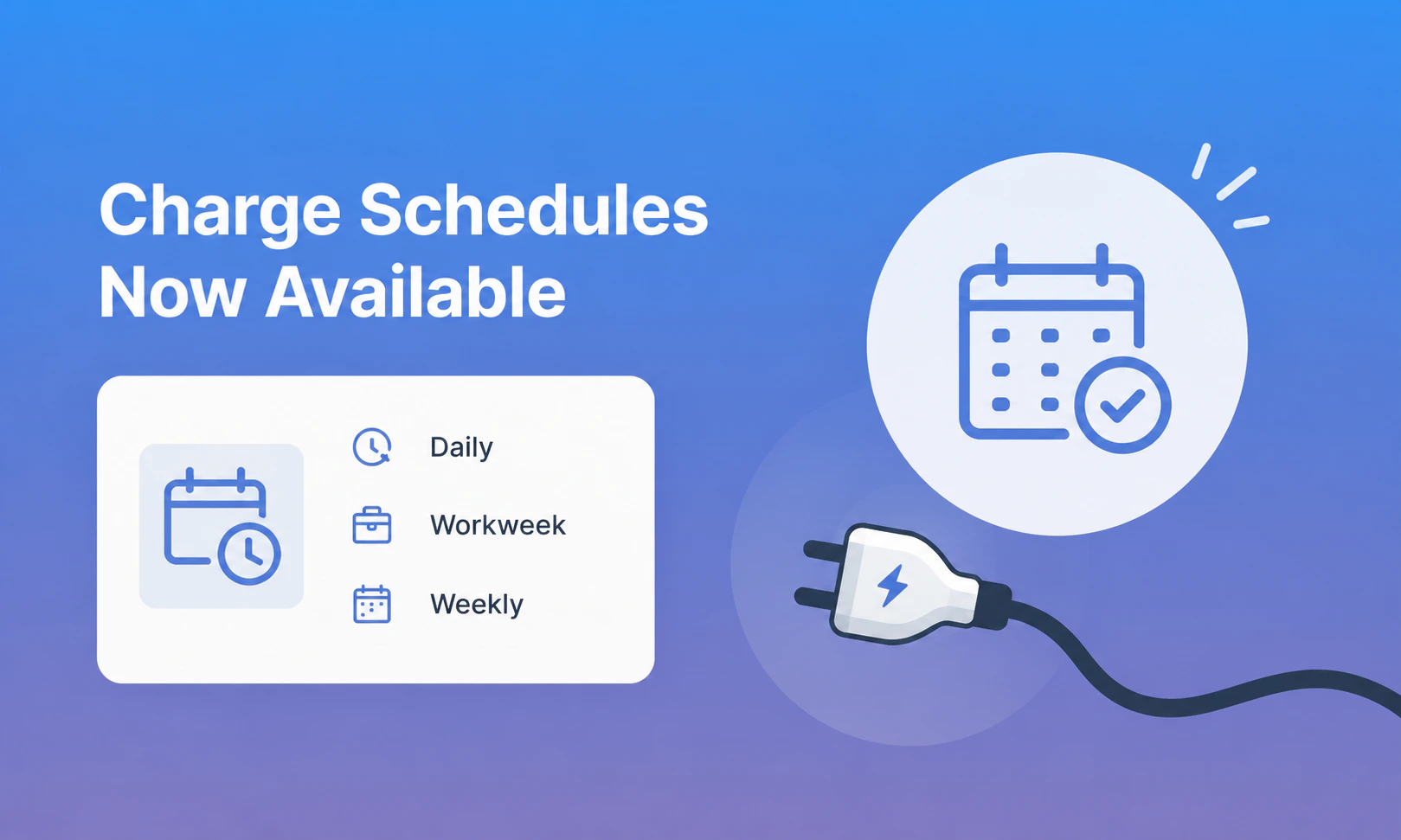 The latest version of Smartcar's API (V3) now includes the ability to create and delete charge schedules for Volvo and Tesla. Support for additional makes coming soon! Charge schedules apply to BEV and PHEV vehicles.
Three schedule types are supported:
* **Daily**: One charging window that applies every day.
* **Workweek**: A weekday schedule and a separate weekend schedule.
* **Weekly**: A different schedule for each day or specific days of the week.
**Supported makes:**
* **Tesla**: [Daily](/api-reference/charge-schedules/set-daily-charge-schedule), [Weekly](/api-reference/charge-schedules/set-weekly-charge-schedule), and [Workweek](/api-reference/charge-schedules/set-workweek-charge-schedule) schedules
* **Volvo**: [Daily](/api-reference/charge-schedules/set-daily-charge-schedule) schedules only. [Brand quirks apply](/help/brand-quirks#charge-schedules), review before integrating.
For the most up-to-date list of makes that support charge schedules, see the [compatibility matrix](https://smartcar.com/product/compatible-vehicles).
**What's new:**
* `POST /v3.0/vehicles/{id}/charge-schedules/daily`, `workweek`, and `weekly`
* `DELETE /v3.0/vehicles/{id}/charge-schedules/{scheduleId}`
Learn more about these endpoints [here](/api-reference/commands/overview)
You can retrieve existing charge schedules via Webhooks or by issuing a GET request to the API for the [`Charge.ChargeTimers`](/api-reference/signals/charge#charge-timers) signal.
**Get started**: Make sure your app has been granted `control_charge` permissions before issuing API requests.
## Vehicle Location is now available for Volvo US
The Location signal is now available for Volvo vehicles connected in the US. Applications subscribed to Location can read latitude and longitude for these vehicles without any code changes.
**What's new:**
* Location data flows for US Volvo vehicles through the existing [Location](/api-reference/signals/location) signal
* No new permissions, fields, or migration required for apps already subscribed to Location
**Get started**: If your application already requests the Location signal, no action is needed. To add it, update your permissions in the [Smartcar Dashboard](https://dashboard.smartcar.com) and review the [Location](/api-reference/signals/location) signal reference.
## Filter vehicle connections by powertrain type
You can now restrict which vehicles can connect to your application based on powertrain type. The new **Connection Filters** tab in your application's Configuration page on the Smartcar Dashboard lets you allow or block connections from `ICE`, `BEV`, and `PHEV` vehicles.
**What's new:**
* Select which powertrain types are allowed to connect — unselected types are blocked from completing the Connect flow
* Optionally block vehicles whose powertrain type cannot be verified at connection time (affects roughly 1% of connections)
* If no types are selected, the filter is not applied and all types are allowed
**Get started**: Open the **Connection Filters** tab in your application's [Configuration page](https://dashboard.smartcar.com) and publish your filter settings. See the [Connection Filters](/connect/advanced-config/connection-filters) docs for details.
Connection Filters are available on the Custom plan.
## New API version and authentication now available
The Smartcar API has a new version (V3) and a simpler way to authenticate. Your backend exchanges a Client ID and Client Secret for an access token that works across all your connected vehicles. No per-vehicle tokens, no refresh logic.
**What's new:**
* New V3 API endpoints for vehicle data, commands, and connections
* Generate API credentials from the **API Credentials** tab in your Dashboard
* One access token valid for 1 hour, no refresh tokens to manage
* `sc-user-id` header to scope requests to a specific user
* Webhook payloads include `user.id` for user-level routing
Existing per-vehicle tokens continue to work. Migration is optional for existing customers. For new customers, we recommend using the simpler authentication approach.
**Get started:**
* [API Authentication Setup](/getting-started/how-to/api-authentication) — Step-by-step setup and code examples
* [Overview](/api-reference/authorization/overview) — How it works, key concepts, and security
* [Migration Guide](/getting-started/how-to/m2m/migration-guide) — Transition from per-vehicle tokens
* [FAQ](/getting-started/how-to/m2m/faq) — Common questions and answers
## Introducing the new Compatible Vehicles dataset: redesigned interface and new API
The data behind Smartcar's Compatible Vehicles has been reworked. You can browse signal-level compatibility by make, model, year, region, and powertrain type through a redesigned interface and a dedicated API endpoint.
The dataset updates daily from actual platform activity. Every vehicle listed has connected to Smartcar, delivered compatible signals, and run commands successfully. If a make or model isn't listed, we haven't seen it on the platform yet. Once connected, it will show up in the dataset.
**What's new:**
* See which signals and commands are available for each vehicle, broken out by category: battery, charging, location, odometer, and more
* Filter by powertrain type (BEV, PHEV, ICE, HEV) to scope results to your use case
* Filter by region (US, Canada, Europe) and manufacturer
* New `GET https://compatibility.api.smartcar.com/v3/compatible-vehicles` endpoint
* Compatibility data comes from verified vehicle test results and OEM partner integrations, with better model matching and powertrain classification
**Get started**: Browse the [Compatible Vehicles](/api-reference/compatible-vehicles) page in the API Reference.
## Polish Language Support in Smartcar Connect
The latest version of Smartcar's API (V3) now includes the ability to create and delete charge schedules for Volvo and Tesla. Support for additional makes coming soon! Charge schedules apply to BEV and PHEV vehicles.
Three schedule types are supported:
* **Daily**: One charging window that applies every day.
* **Workweek**: A weekday schedule and a separate weekend schedule.
* **Weekly**: A different schedule for each day or specific days of the week.
**Supported makes:**
* **Tesla**: [Daily](/api-reference/charge-schedules/set-daily-charge-schedule), [Weekly](/api-reference/charge-schedules/set-weekly-charge-schedule), and [Workweek](/api-reference/charge-schedules/set-workweek-charge-schedule) schedules
* **Volvo**: [Daily](/api-reference/charge-schedules/set-daily-charge-schedule) schedules only. [Brand quirks apply](/help/brand-quirks#charge-schedules), review before integrating.
For the most up-to-date list of makes that support charge schedules, see the [compatibility matrix](https://smartcar.com/product/compatible-vehicles).
**What's new:**
* `POST /v3.0/vehicles/{id}/charge-schedules/daily`, `workweek`, and `weekly`
* `DELETE /v3.0/vehicles/{id}/charge-schedules/{scheduleId}`
Learn more about these endpoints [here](/api-reference/commands/overview)
You can retrieve existing charge schedules via Webhooks or by issuing a GET request to the API for the [`Charge.ChargeTimers`](/api-reference/signals/charge#charge-timers) signal.
**Get started**: Make sure your app has been granted `control_charge` permissions before issuing API requests.
## Vehicle Location is now available for Volvo US
The Location signal is now available for Volvo vehicles connected in the US. Applications subscribed to Location can read latitude and longitude for these vehicles without any code changes.
**What's new:**
* Location data flows for US Volvo vehicles through the existing [Location](/api-reference/signals/location) signal
* No new permissions, fields, or migration required for apps already subscribed to Location
**Get started**: If your application already requests the Location signal, no action is needed. To add it, update your permissions in the [Smartcar Dashboard](https://dashboard.smartcar.com) and review the [Location](/api-reference/signals/location) signal reference.
## Filter vehicle connections by powertrain type
You can now restrict which vehicles can connect to your application based on powertrain type. The new **Connection Filters** tab in your application's Configuration page on the Smartcar Dashboard lets you allow or block connections from `ICE`, `BEV`, and `PHEV` vehicles.
**What's new:**
* Select which powertrain types are allowed to connect — unselected types are blocked from completing the Connect flow
* Optionally block vehicles whose powertrain type cannot be verified at connection time (affects roughly 1% of connections)
* If no types are selected, the filter is not applied and all types are allowed
**Get started**: Open the **Connection Filters** tab in your application's [Configuration page](https://dashboard.smartcar.com) and publish your filter settings. See the [Connection Filters](/connect/advanced-config/connection-filters) docs for details.
Connection Filters are available on the Custom plan.
## New API version and authentication now available
The Smartcar API has a new version (V3) and a simpler way to authenticate. Your backend exchanges a Client ID and Client Secret for an access token that works across all your connected vehicles. No per-vehicle tokens, no refresh logic.
**What's new:**
* New V3 API endpoints for vehicle data, commands, and connections
* Generate API credentials from the **API Credentials** tab in your Dashboard
* One access token valid for 1 hour, no refresh tokens to manage
* `sc-user-id` header to scope requests to a specific user
* Webhook payloads include `user.id` for user-level routing
Existing per-vehicle tokens continue to work. Migration is optional for existing customers. For new customers, we recommend using the simpler authentication approach.
**Get started:**
* [API Authentication Setup](/getting-started/how-to/api-authentication) — Step-by-step setup and code examples
* [Overview](/api-reference/authorization/overview) — How it works, key concepts, and security
* [Migration Guide](/getting-started/how-to/m2m/migration-guide) — Transition from per-vehicle tokens
* [FAQ](/getting-started/how-to/m2m/faq) — Common questions and answers
## Introducing the new Compatible Vehicles dataset: redesigned interface and new API
The data behind Smartcar's Compatible Vehicles has been reworked. You can browse signal-level compatibility by make, model, year, region, and powertrain type through a redesigned interface and a dedicated API endpoint.
The dataset updates daily from actual platform activity. Every vehicle listed has connected to Smartcar, delivered compatible signals, and run commands successfully. If a make or model isn't listed, we haven't seen it on the platform yet. Once connected, it will show up in the dataset.
**What's new:**
* See which signals and commands are available for each vehicle, broken out by category: battery, charging, location, odometer, and more
* Filter by powertrain type (BEV, PHEV, ICE, HEV) to scope results to your use case
* Filter by region (US, Canada, Europe) and manufacturer
* New `GET https://compatibility.api.smartcar.com/v3/compatible-vehicles` endpoint
* Compatibility data comes from verified vehicle test results and OEM partner integrations, with better model matching and powertrain classification
**Get started**: Browse the [Compatible Vehicles](/api-reference/compatible-vehicles) page in the API Reference.
## Polish Language Support in Smartcar Connect
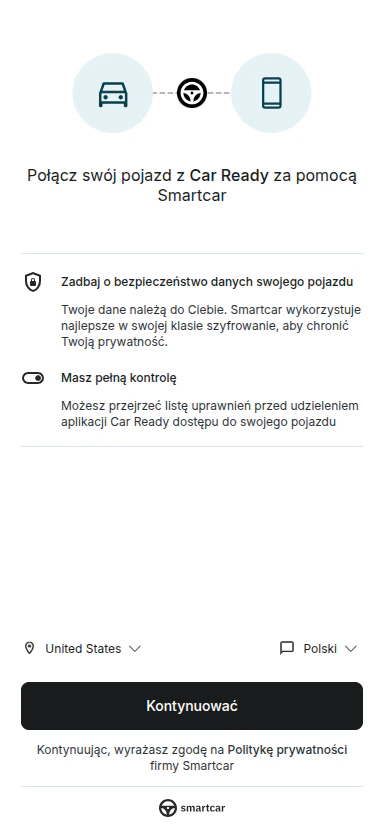 Smartcar Connect now supports Polish, making it easier for Polish-speaking vehicle owners to understand and complete the vehicle linking process.
When a user's browser language is set to Polish, or when they manually select "Polski" from the language dropdown, all Connect screens including the preamble, permissions, and OEM login will be displayed in Polish.
**Get started**: Polish is automatically available to all applications using Smartcar Connect. No configuration changes are needed. Learn more about [country and language settings](/connect/advanced-config/country-flag) in Connect.
## Vehicle Simulator now supports Smartcar Connect simulation
You can now test simulated vehicle connection flows in the [Vehicle Simulator](/getting-started/dashboard/simulator), including experiences that mirror how vehicle owners connect through [Smartcar Connect](/connect/what-is-connect).
**What's new:**
* **Connection-state testing** — Create simulated vehicles in a disconnected state, then connect them later to test connection and reconnection behavior.
* **Two connection options** — Connect simulated vehicles automatically, or run a full Smartcar Connect simulation flow with simulated credentials.
* **Brand simulation in Connect flow** — Vehicles connected through simulated Connect reflect the selected brand in Dashboard views, webhook payloads, and API responses (`vehicle.make`).
* **Permissions parity for simulation** — Simulator connection flows use the configured `VehicleUserAccount.Permissions` signal, which overrides app-level permissions.
* **Disconnect and resubscribe workflows** — Disconnect simulated vehicles from Dashboard tables or via API, while preserving the simulated vehicle for future reconnection tests.
**Get started**: Create a simulated vehicle in the Dashboard to test automatic connection, Connect simulation, and disconnection scenarios in [Vehicle Simulator](/getting-started/dashboard/simulator).
## Powertrain Type Now Available in Webhook and API V3 Responses
The `vehicle` object in `VEHICLE_STATE` webhook payloads and API V3 responses now includes a `powertrainType` field. This field indicates the vehicle's powertrain and returns one of the following values: `BEV` (Battery Electric Vehicle), `PHEV` (Plug-in Hybrid Electric Vehicle), `ICE` (Internal Combustion Engine), or `HEV` (Hybrid Electric Vehicle).
**Example webhook payload:**
```json theme={null}
{
"vehicle": {
"id": "9af13248-3b73-4c9d-9a4b-d937ce6bc8e2",
"make": "TESLA",
"model": "Model 3",
"year": 2020,
"powertrainType": "BEV"
}
}
```
Developers can use this value to filter data and tailor different customer experiences based on powertrain type. For example, you can show battery level for BEV vehicles, fuel level for ICE vehicles, or both for PHEV vehicles.
**Get started**: The `powertrainType` field is automatically included in all `VEHICLE_STATE` webhook deliveries and API V3 vehicle responses — no configuration changes are needed. See the [VEHICLE\_STATE webhook reference](/api-reference/webhooks/events/vehicle-state) for the full payload structure.
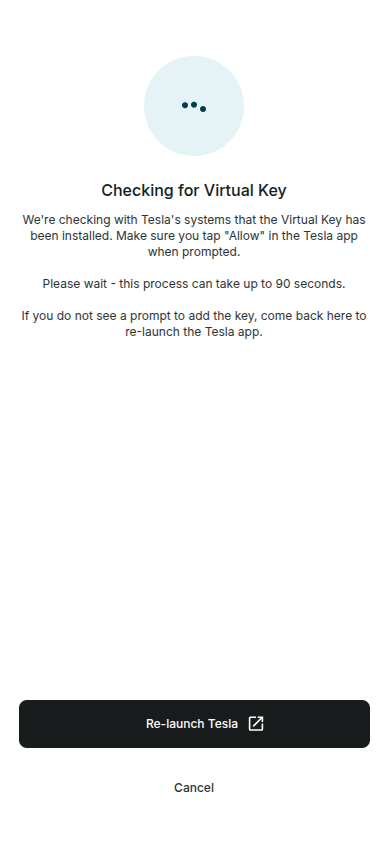
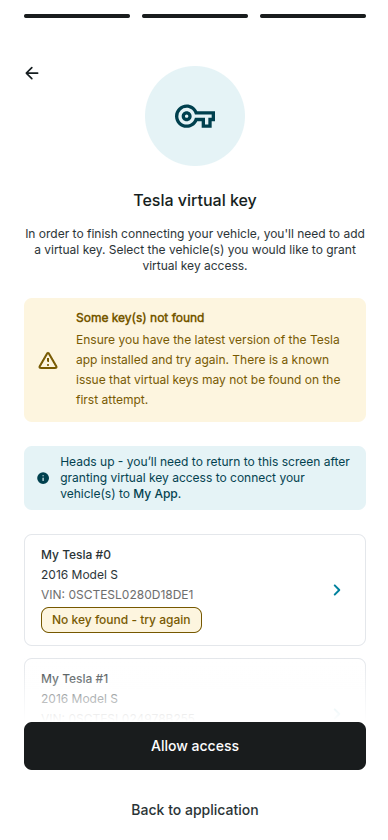
## Tesla Virtual Key Pairing flow improvements
We've improved the Tesla Virtual Key Pairing experience to make recovery from first-attempt failures clearer and faster.
**What's new:**
* **Clearer retry guidance** — If the "Add virtual key" prompt does not appear in the Tesla app, users are now prompted to try again since the second attempt often succeeds.
* **New "Relaunch Tesla" action** — Vehicle owners can immediately relaunch the Tesla app from the pairing flow and retry without returning to the vehicle list.
## All-New Vehicle Simulator
Smartcar Connect now supports Polish, making it easier for Polish-speaking vehicle owners to understand and complete the vehicle linking process.
When a user's browser language is set to Polish, or when they manually select "Polski" from the language dropdown, all Connect screens including the preamble, permissions, and OEM login will be displayed in Polish.
**Get started**: Polish is automatically available to all applications using Smartcar Connect. No configuration changes are needed. Learn more about [country and language settings](/connect/advanced-config/country-flag) in Connect.
## Vehicle Simulator now supports Smartcar Connect simulation
You can now test simulated vehicle connection flows in the [Vehicle Simulator](/getting-started/dashboard/simulator), including experiences that mirror how vehicle owners connect through [Smartcar Connect](/connect/what-is-connect).
**What's new:**
* **Connection-state testing** — Create simulated vehicles in a disconnected state, then connect them later to test connection and reconnection behavior.
* **Two connection options** — Connect simulated vehicles automatically, or run a full Smartcar Connect simulation flow with simulated credentials.
* **Brand simulation in Connect flow** — Vehicles connected through simulated Connect reflect the selected brand in Dashboard views, webhook payloads, and API responses (`vehicle.make`).
* **Permissions parity for simulation** — Simulator connection flows use the configured `VehicleUserAccount.Permissions` signal, which overrides app-level permissions.
* **Disconnect and resubscribe workflows** — Disconnect simulated vehicles from Dashboard tables or via API, while preserving the simulated vehicle for future reconnection tests.
**Get started**: Create a simulated vehicle in the Dashboard to test automatic connection, Connect simulation, and disconnection scenarios in [Vehicle Simulator](/getting-started/dashboard/simulator).
## Powertrain Type Now Available in Webhook and API V3 Responses
The `vehicle` object in `VEHICLE_STATE` webhook payloads and API V3 responses now includes a `powertrainType` field. This field indicates the vehicle's powertrain and returns one of the following values: `BEV` (Battery Electric Vehicle), `PHEV` (Plug-in Hybrid Electric Vehicle), `ICE` (Internal Combustion Engine), or `HEV` (Hybrid Electric Vehicle).
**Example webhook payload:**
```json theme={null}
{
"vehicle": {
"id": "9af13248-3b73-4c9d-9a4b-d937ce6bc8e2",
"make": "TESLA",
"model": "Model 3",
"year": 2020,
"powertrainType": "BEV"
}
}
```
Developers can use this value to filter data and tailor different customer experiences based on powertrain type. For example, you can show battery level for BEV vehicles, fuel level for ICE vehicles, or both for PHEV vehicles.
**Get started**: The `powertrainType` field is automatically included in all `VEHICLE_STATE` webhook deliveries and API V3 vehicle responses — no configuration changes are needed. See the [VEHICLE\_STATE webhook reference](/api-reference/webhooks/events/vehicle-state) for the full payload structure.
## Tesla Virtual Key Pairing flow improvements
We've improved the Tesla Virtual Key Pairing experience to make recovery from first-attempt failures clearer and faster.
**What's new:**
* **Clearer retry guidance** — If the "Add virtual key" prompt does not appear in the Tesla app, users are now prompted to try again since the second attempt often succeeds.
* **New "Relaunch Tesla" action** — Vehicle owners can immediately relaunch the Tesla app from the pairing flow and retry without returning to the vehicle list.
## All-New Vehicle Simulator
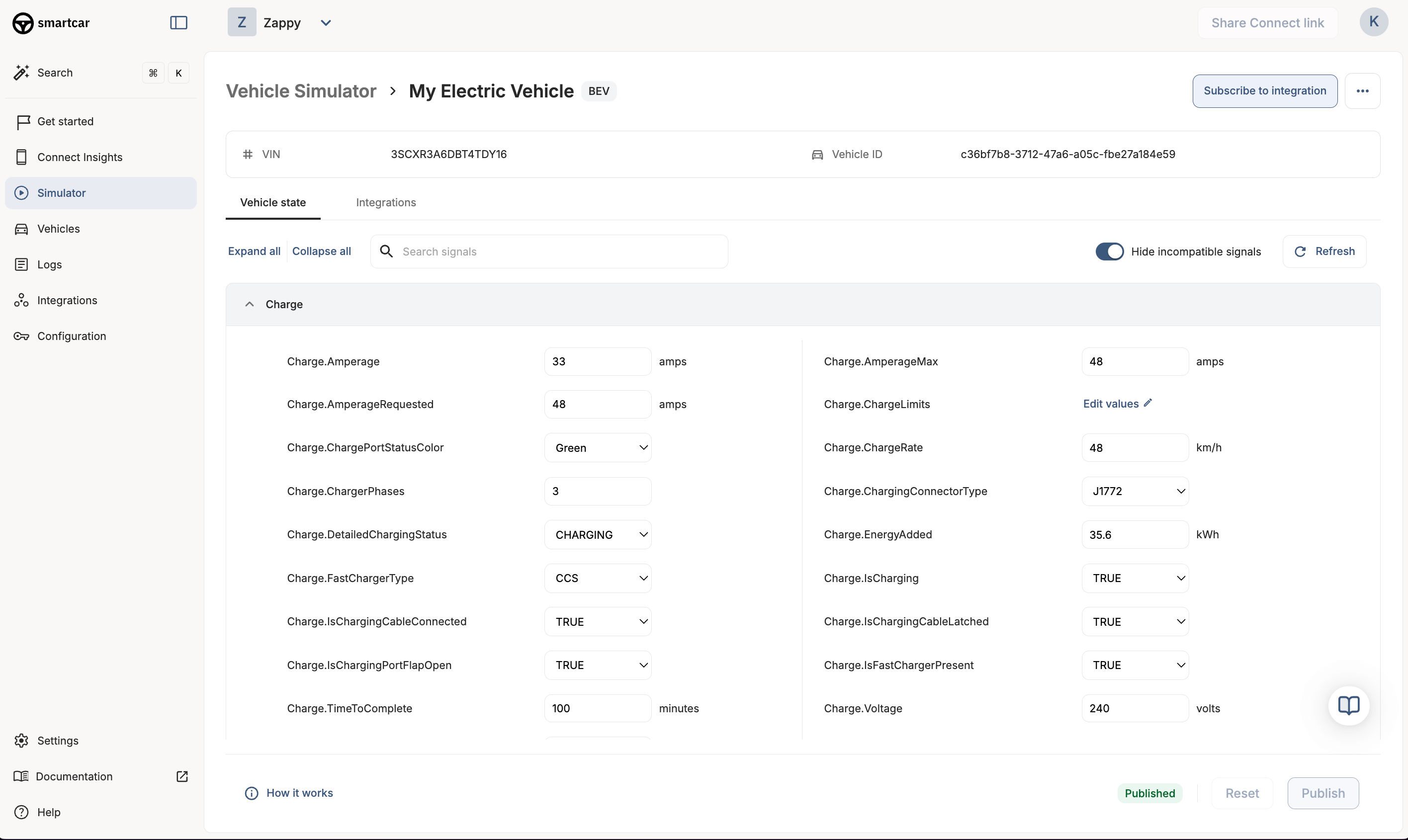 We've rebuilt the [Vehicle Simulator](/getting-started/dashboard/simulator) from the ground up. The new simulator gives you full control over your simulated vehicle's state and lets you test your Smartcar integration end-to-end — including webhooks — without needing a real vehicle.
**What's new:**
* **Configuration-based testing** — Directly configure your simulated vehicle's state and see changes reflected immediately in API responses and webhook deliveries. No more waiting for trips to play out.
* **Webhook testing** — Subscribe simulated vehicles to your existing [webhook integrations](/integrations/webhooks/overview) and trigger deliveries by publishing vehicle state changes. Test your full webhook pipeline without a live vehicle.
* **Full signal configuration** — Configure all available signals organized by signal group, with default values provided for every signal. The signal groups match the same structure you see when setting up [vehicle permissions](/api-reference/permissions) for your application.
* **Permission simulation** — Toggle individual permissions on or off to test how your application handles partial permission grants and permission errors.
* **Vehicle commands** — Test lock/unlock, start/stop charge, set charge limit, and send destination. Commands trigger realistic state changes on the simulated vehicle.
* **Error state testing** — Recreate error scenarios like permission denials or in-motion lock attempts to validate your application's error handling.
The previous simulator remains available as [Vehicle Simulator (Legacy)](/getting-started/dashboard/simulator-legacy).
**Get started**: Open the [Simulator](/getting-started/dashboard/simulator) in your Smartcar Dashboard and create your first simulated vehicle.
## Charging signal CONNECTOR replaced with CHARGING\_TYPE is now live
The charging signal change [announced on January 12th](#upcoming-change-charging-signal-connector-to-charging_type) is now live. The `CONNECTOR` type has been replaced with `CHARGING_TYPE` in the following signals:
* Charge.ChargeLimits
* Charge.ChargeRecords
* Charge.ChargeTimers
These signals now return the charging current type (`AC` or `DC`) instead of a connector hardware type. If your integration parses any of these signals and still references the `CONNECTOR` type, update your code to use `CHARGING_TYPE` and parse the `chargingType` field.
For full details on the change, see the [original announcement](#upcoming-change-charging-signal-connector-to-charging_type) below.
## Send Destination now available for Volkswagen
You can now use the Smartcar API to send destinations to Volkswagen vehicles in the United States.
With the Send Destination command, your application can route a destination directly to a driver's built-in navigation screen. This unlocks new workflows:
* Fleet management: Route drivers to their next pickup, delivery, or service location
* Car sharing and rentals: Send return location addresses when a rental period is ending
* Repair and maintenance: Direct customers to your nearest service center when maintenance is needed
* Charging networks: Guide EV drivers to available chargers when battery is low
**Get started**: Request the `control_navigation` permission during the Smartcar Connect flow and call [Send Destination](/api-reference/send-destination-to-vehicle).
## Ruby SDK and Java SDK Updated to Support Version 3 of the Vehicles API
The [Ruby SDK](https://github.com/smartcar/ruby-sdk) and [Java SDK](https://github.com/smartcar/java-sdk) have been updated to support [Version 3 of the Vehicles API](/api-reference/intro).
Both SDKs now include three new methods:
* `get_vehicle` - Retrieve vehicle information
* `get_signal` - Get a specific signal for a vehicle
* `get_signals` - Get all available signals for a vehicle
These new methods provide easier access to vehicle data through the latest API version, enabling developers to work with Smartcar's expanded signal catalog and improved data delivery capabilities.
**Get started**: Update to the latest SDK version and explore the new methods in the [Ruby SDK](https://github.com/smartcar/ruby-sdk) and [Java SDK](https://github.com/smartcar/java-sdk) documentation.
## Volvo Cars Partner Integration now available!
We've rebuilt the [Vehicle Simulator](/getting-started/dashboard/simulator) from the ground up. The new simulator gives you full control over your simulated vehicle's state and lets you test your Smartcar integration end-to-end — including webhooks — without needing a real vehicle.
**What's new:**
* **Configuration-based testing** — Directly configure your simulated vehicle's state and see changes reflected immediately in API responses and webhook deliveries. No more waiting for trips to play out.
* **Webhook testing** — Subscribe simulated vehicles to your existing [webhook integrations](/integrations/webhooks/overview) and trigger deliveries by publishing vehicle state changes. Test your full webhook pipeline without a live vehicle.
* **Full signal configuration** — Configure all available signals organized by signal group, with default values provided for every signal. The signal groups match the same structure you see when setting up [vehicle permissions](/api-reference/permissions) for your application.
* **Permission simulation** — Toggle individual permissions on or off to test how your application handles partial permission grants and permission errors.
* **Vehicle commands** — Test lock/unlock, start/stop charge, set charge limit, and send destination. Commands trigger realistic state changes on the simulated vehicle.
* **Error state testing** — Recreate error scenarios like permission denials or in-motion lock attempts to validate your application's error handling.
The previous simulator remains available as [Vehicle Simulator (Legacy)](/getting-started/dashboard/simulator-legacy).
**Get started**: Open the [Simulator](/getting-started/dashboard/simulator) in your Smartcar Dashboard and create your first simulated vehicle.
## Charging signal CONNECTOR replaced with CHARGING\_TYPE is now live
The charging signal change [announced on January 12th](#upcoming-change-charging-signal-connector-to-charging_type) is now live. The `CONNECTOR` type has been replaced with `CHARGING_TYPE` in the following signals:
* Charge.ChargeLimits
* Charge.ChargeRecords
* Charge.ChargeTimers
These signals now return the charging current type (`AC` or `DC`) instead of a connector hardware type. If your integration parses any of these signals and still references the `CONNECTOR` type, update your code to use `CHARGING_TYPE` and parse the `chargingType` field.
For full details on the change, see the [original announcement](#upcoming-change-charging-signal-connector-to-charging_type) below.
## Send Destination now available for Volkswagen
You can now use the Smartcar API to send destinations to Volkswagen vehicles in the United States.
With the Send Destination command, your application can route a destination directly to a driver's built-in navigation screen. This unlocks new workflows:
* Fleet management: Route drivers to their next pickup, delivery, or service location
* Car sharing and rentals: Send return location addresses when a rental period is ending
* Repair and maintenance: Direct customers to your nearest service center when maintenance is needed
* Charging networks: Guide EV drivers to available chargers when battery is low
**Get started**: Request the `control_navigation` permission during the Smartcar Connect flow and call [Send Destination](/api-reference/send-destination-to-vehicle).
## Ruby SDK and Java SDK Updated to Support Version 3 of the Vehicles API
The [Ruby SDK](https://github.com/smartcar/ruby-sdk) and [Java SDK](https://github.com/smartcar/java-sdk) have been updated to support [Version 3 of the Vehicles API](/api-reference/intro).
Both SDKs now include three new methods:
* `get_vehicle` - Retrieve vehicle information
* `get_signal` - Get a specific signal for a vehicle
* `get_signals` - Get all available signals for a vehicle
These new methods provide easier access to vehicle data through the latest API version, enabling developers to work with Smartcar's expanded signal catalog and improved data delivery capabilities.
**Get started**: Update to the latest SDK version and explore the new methods in the [Ruby SDK](https://github.com/smartcar/ruby-sdk) and [Java SDK](https://github.com/smartcar/java-sdk) documentation.
## Volvo Cars Partner Integration now available!
 Smartcar is excited to announce a partnership with Volvo Cars, providing access to vehicles across the United States and Europe.
**What's new:**
* Access charging, battery, location, and odometer data through Smartcar signals
* Use the updated consent flow through Volvo's official portal
Learn more in the [Volvo integration updates](/help/oem-integrations/volvo/whats-new).
## Upcoming change: Charging signal `CONNECTOR` to `CHARGING_TYPE`
On January 28th, 2026, we're updating three charging-related signals. This is a breaking change that may require updates to your integration.
**Affected signals:**
* `Charge.ChargeLimits`
* `Charge.ChargeRecords`
* `Charge.ChargeTimers`
**What's changing:**
In all three signals, the `CONNECTOR` type is being replaced with `CHARGING_TYPE`. Instead of returning a connector hardware type (e.g., `J1772`), these signals will now return the charging current type (`AC` or `DC`).
**Before (current format):**
```json theme={null}
{
"type": "CONNECTOR",
"condition": {
"connectorType": "J1772"
}
}
```
**After (new format):**
```json theme={null}
{
"type": "CHARGING_TYPE",
"condition": {
"chargingType": "AC"
}
}
```
Other types such as `GLOBAL` and `LOCATION` remain unchanged.
**Why we're making this change:**
OEMs report connector hardware types inconsistently--some return proprietary strings, others return nothing at all. In contrast, AC vs. DC charging type is more widely provided across manufacturers.
This change gives you more consistent, actionable data. Rather than maintaining a mapping of connector type strings, you can rely on a simple AC or DC value to determine whether the vehicle is on Level 1/2 charging or DC fast charging.
**What you need to do:**
If your integration parses any of these signals and handles the `CONNECTOR` type, update your code to:
* Expect `CHARGING_TYPE` instead of `CONNECTOR`
* Parse `chargingType` (values: `AC` or `DC`) instead of `connectorType`
**Timeline:**
* Now -> January 27th, 2026: Current format remains in place
* January 28th, 2026: New format goes live
**Questions?**
Reach out to your Smartcar account manager or [contact support](https://smartcar.com/contact).
Smartcar is excited to announce a partnership with Volvo Cars, providing access to vehicles across the United States and Europe.
**What's new:**
* Access charging, battery, location, and odometer data through Smartcar signals
* Use the updated consent flow through Volvo's official portal
Learn more in the [Volvo integration updates](/help/oem-integrations/volvo/whats-new).
## Upcoming change: Charging signal `CONNECTOR` to `CHARGING_TYPE`
On January 28th, 2026, we're updating three charging-related signals. This is a breaking change that may require updates to your integration.
**Affected signals:**
* `Charge.ChargeLimits`
* `Charge.ChargeRecords`
* `Charge.ChargeTimers`
**What's changing:**
In all three signals, the `CONNECTOR` type is being replaced with `CHARGING_TYPE`. Instead of returning a connector hardware type (e.g., `J1772`), these signals will now return the charging current type (`AC` or `DC`).
**Before (current format):**
```json theme={null}
{
"type": "CONNECTOR",
"condition": {
"connectorType": "J1772"
}
}
```
**After (new format):**
```json theme={null}
{
"type": "CHARGING_TYPE",
"condition": {
"chargingType": "AC"
}
}
```
Other types such as `GLOBAL` and `LOCATION` remain unchanged.
**Why we're making this change:**
OEMs report connector hardware types inconsistently--some return proprietary strings, others return nothing at all. In contrast, AC vs. DC charging type is more widely provided across manufacturers.
This change gives you more consistent, actionable data. Rather than maintaining a mapping of connector type strings, you can rely on a simple AC or DC value to determine whether the vehicle is on Level 1/2 charging or DC fast charging.
**What you need to do:**
If your integration parses any of these signals and handles the `CONNECTOR` type, update your code to:
* Expect `CHARGING_TYPE` instead of `CONNECTOR`
* Parse `chargingType` (values: `AC` or `DC`) instead of `connectorType`
**Timeline:**
* Now -> January 27th, 2026: Current format remains in place
* January 28th, 2026: New format goes live
**Questions?**
Reach out to your Smartcar account manager or [contact support](https://smartcar.com/contact).