> ## Documentation Index
> Fetch the complete documentation index at: https://smartcar.com/docs/llms.txt
> Use this file to discover all available pages before exploring further.
# 2025 Releases
## Mercedes-Benz Partner Integration Now Available in Europe!
 We're excited to announce that Mercedes-Benz is now available on Smartcar! Connect Mercedes-Benz electric vehicles (BEV and PHEV) to access vehicle data and enable smart charging capabilities.
**What's new:**
* Mercedes-Benz BEV and PHEV vehicles can now connect through Smartcar
* Enhanced connect flow with VIN verification for Mercedes vehicles
* Support for key vehicle data signals including battery level, charge status, and location
**Important notes:**
* Currently, only Battery Electric Vehicles (BEV) and Plug-in Hybrid Electric Vehicles (PHEV) are supported with this integration.
* Need support for other Mercedes vehicle types? [Contact us](https://smartcar.com/contact) to discuss your requirements.
Check out the [Mercedes-Benz integration guide](/help/oem-integrations/mercedes/whats-new) for more details.
## Vehicle data in Dashboard Coming Soon!
We're excited to announce that Mercedes-Benz is now available on Smartcar! Connect Mercedes-Benz electric vehicles (BEV and PHEV) to access vehicle data and enable smart charging capabilities.
**What's new:**
* Mercedes-Benz BEV and PHEV vehicles can now connect through Smartcar
* Enhanced connect flow with VIN verification for Mercedes vehicles
* Support for key vehicle data signals including battery level, charge status, and location
**Important notes:**
* Currently, only Battery Electric Vehicles (BEV) and Plug-in Hybrid Electric Vehicles (PHEV) are supported with this integration.
* Need support for other Mercedes vehicle types? [Contact us](https://smartcar.com/contact) to discuss your requirements.
Check out the [Mercedes-Benz integration guide](/help/oem-integrations/mercedes/whats-new) for more details.
## Vehicle data in Dashboard Coming Soon!
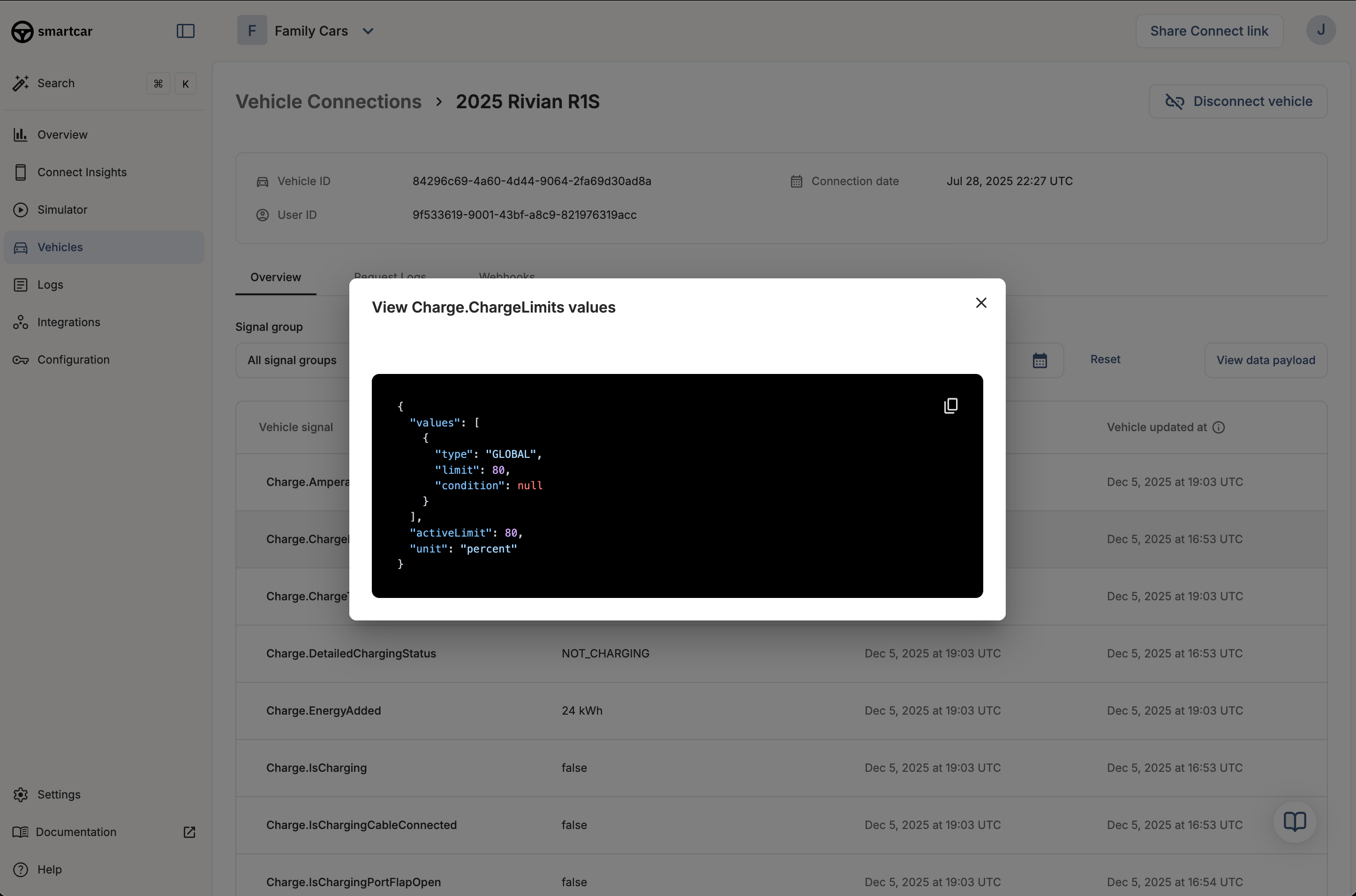 Vehicle data will be available in your Smartcar Dashboard. This feature is now rolling out to some customers and will be available to all customers over the next few weeks.
If you are interested in this feature or have any questions, please reach out to your Smartcar account manager or contact our support team.
## Dashboard updates: API logs, timezone controls, and more!
We've added more visibility into production usage in the Dashboard so you can monitor API requests and webhook delivery health in one place.
**What's new:**
* **API V3 call tracking**: See which API V3 endpoints are being called directly in the Dashboard to monitor migration progress
* **Active vehicle counter**: Track how many vehicles are actively delivering webhooks successfully to spot delivery gaps faster
* **Timezone customization**: Set your preferred timezone in the Dashboard so charts and tables align with your operations
**Get started**: Check out these updates in the [Smartcar Dashboard](https://dashboard.smartcar.com/).
## BMW Charging API now live across Europe
Vehicle data will be available in your Smartcar Dashboard. This feature is now rolling out to some customers and will be available to all customers over the next few weeks.
If you are interested in this feature or have any questions, please reach out to your Smartcar account manager or contact our support team.
## Dashboard updates: API logs, timezone controls, and more!
We've added more visibility into production usage in the Dashboard so you can monitor API requests and webhook delivery health in one place.
**What's new:**
* **API V3 call tracking**: See which API V3 endpoints are being called directly in the Dashboard to monitor migration progress
* **Active vehicle counter**: Track how many vehicles are actively delivering webhooks successfully to spot delivery gaps faster
* **Timezone customization**: Set your preferred timezone in the Dashboard so charts and tables align with your operations
**Get started**: Check out these updates in the [Smartcar Dashboard](https://dashboard.smartcar.com/).
## BMW Charging API now live across Europe
 We've partnered with BMW to bring their new Charging API to Europe, giving energy providers privacy-first access to BMW EVs for smart charging, grid optimization, and home energy management.
This integration is now available in select European markets. Reach out to your Smartcar team to enable BMW Charging for your app or learn more in the [partnership announcement](https://smartcar.com/blog/smartcar-and-bmw-partnership).
## Improved Webhook Logs in Dashboard
We've significantly improved the webhook logging experience in the Smartcar Dashboard, making it easier to monitor and debug webhook deliveries.
**What's New:**
* **Delivery-focused logging**: Each log row now represents a single webhook delivery, providing a clearer view of your webhook activity
* **Detailed inspection**: Click "View logs" on any delivery to inspect the signal or endpoint items included in that delivery and their individual statuses
* **Faster performance**: Reduced latency in both Webhook Logs and the webhook deliveries over time chart for a more responsive experience
**Where to Find It:**
You can view your webhook logs in two locations:
* **Logs > Webhooks** in the main navigation
* **Vehicles > \[Selected vehicle] > Webhooks** for vehicle-specific logs
**Get started**: Head to the [Smartcar Dashboard](https://dashboard.smartcar.com/logs?tab=webhooks) to explore the improved webhook logs.
## Python SDK and Node SDK Updated to Support Version 3 of the Vehicles API
The [Python SDK](https://github.com/smartcar/python-sdk) and [Node SDK](https://github.com/smartcar/node-sdk) have been updated to support [Version 3 of the Vehicles API](/api-reference/intro).
Both SDKs now include three new methods:
* `get_vehicle` - Retrieve vehicle information
* `get_signal` - Get a specific signal for a vehicle
* `get_signals` - Get all available signals for a vehicle
These new methods provide easier access to vehicle data through the latest API version, enabling developers to work with Smartcar's expanded signal catalog and improved data delivery capabilities.
**Get started**: Update to the latest SDK version and explore the new methods in the [Python SDK](https://github.com/smartcar/python-sdk) and [Node SDK](https://github.com/smartcar/node-sdk) documentation.
## Polestar and BYD are now available on Smartcar!
We've partnered with BMW to bring their new Charging API to Europe, giving energy providers privacy-first access to BMW EVs for smart charging, grid optimization, and home energy management.
This integration is now available in select European markets. Reach out to your Smartcar team to enable BMW Charging for your app or learn more in the [partnership announcement](https://smartcar.com/blog/smartcar-and-bmw-partnership).
## Improved Webhook Logs in Dashboard
We've significantly improved the webhook logging experience in the Smartcar Dashboard, making it easier to monitor and debug webhook deliveries.
**What's New:**
* **Delivery-focused logging**: Each log row now represents a single webhook delivery, providing a clearer view of your webhook activity
* **Detailed inspection**: Click "View logs" on any delivery to inspect the signal or endpoint items included in that delivery and their individual statuses
* **Faster performance**: Reduced latency in both Webhook Logs and the webhook deliveries over time chart for a more responsive experience
**Where to Find It:**
You can view your webhook logs in two locations:
* **Logs > Webhooks** in the main navigation
* **Vehicles > \[Selected vehicle] > Webhooks** for vehicle-specific logs
**Get started**: Head to the [Smartcar Dashboard](https://dashboard.smartcar.com/logs?tab=webhooks) to explore the improved webhook logs.
## Python SDK and Node SDK Updated to Support Version 3 of the Vehicles API
The [Python SDK](https://github.com/smartcar/python-sdk) and [Node SDK](https://github.com/smartcar/node-sdk) have been updated to support [Version 3 of the Vehicles API](/api-reference/intro).
Both SDKs now include three new methods:
* `get_vehicle` - Retrieve vehicle information
* `get_signal` - Get a specific signal for a vehicle
* `get_signals` - Get all available signals for a vehicle
These new methods provide easier access to vehicle data through the latest API version, enabling developers to work with Smartcar's expanded signal catalog and improved data delivery capabilities.
**Get started**: Update to the latest SDK version and explore the new methods in the [Python SDK](https://github.com/smartcar/python-sdk) and [Node SDK](https://github.com/smartcar/node-sdk) documentation.
## Polestar and BYD are now available on Smartcar!
 We're excited to bring compatibility for Polestar and BYD, expanding the number of brands on the platform to 45!
To enroll vehicles from these brands, make sure you have them enabled for your application in the [Dashboard](https://dashboard.smartcar.com/configuration?tab=oem-brands).
Once enabled, you can direct vehicle owners to connect their Polestar and BYD vehicles through the Smartcar Connect flow.
For a list of data points supported for these brands, see the [compatibility matrix](https://smartcar.com/product/compatible-vehicles).
See important note about [BYD's login requirement](/help/brand-quirks#byd).
## Upcoming Change to Webhook Payload Structure
Webhook `VEHICLE_STATE` payloads are being updated to include a `status` value for all signals. Previously, a `status` value was only passed for signals with errors.
Example Payload:
```json theme={null}
{
"code": "location-preciselocation",
"name": "PreciseLocation",
"group": "Location",
"body": {
"latitude": 37.386051,
"longitude": -122.083855
},
"status": {
"value": "SUCCESS"
}
},
```
This change will go live on November 17, 2025, at 11:00AM Pacific Time. Please ensure your webhook receiver is prepared to handle deliveries in this format.
## Extended Expiration Times for Vehicle Refresh Tokens
Starting November 12, 2025, Vehicle Refresh Tokens will expire 10 minutes after they are used to generate a new token set. This is an extension from the previous expiration time of 1 minute.
For more information about access tokens, see [Refreshing Access Tokens](/api-reference/authorization/refreshing-access-token)
## Verifying webhooks just got a lot easier!
We're excited to bring compatibility for Polestar and BYD, expanding the number of brands on the platform to 45!
To enroll vehicles from these brands, make sure you have them enabled for your application in the [Dashboard](https://dashboard.smartcar.com/configuration?tab=oem-brands).
Once enabled, you can direct vehicle owners to connect their Polestar and BYD vehicles through the Smartcar Connect flow.
For a list of data points supported for these brands, see the [compatibility matrix](https://smartcar.com/product/compatible-vehicles).
See important note about [BYD's login requirement](/help/brand-quirks#byd).
## Upcoming Change to Webhook Payload Structure
Webhook `VEHICLE_STATE` payloads are being updated to include a `status` value for all signals. Previously, a `status` value was only passed for signals with errors.
Example Payload:
```json theme={null}
{
"code": "location-preciselocation",
"name": "PreciseLocation",
"group": "Location",
"body": {
"latitude": 37.386051,
"longitude": -122.083855
},
"status": {
"value": "SUCCESS"
}
},
```
This change will go live on November 17, 2025, at 11:00AM Pacific Time. Please ensure your webhook receiver is prepared to handle deliveries in this format.
## Extended Expiration Times for Vehicle Refresh Tokens
Starting November 12, 2025, Vehicle Refresh Tokens will expire 10 minutes after they are used to generate a new token set. This is an extension from the previous expiration time of 1 minute.
For more information about access tokens, see [Refreshing Access Tokens](/api-reference/authorization/refreshing-access-token)
## Verifying webhooks just got a lot easier!
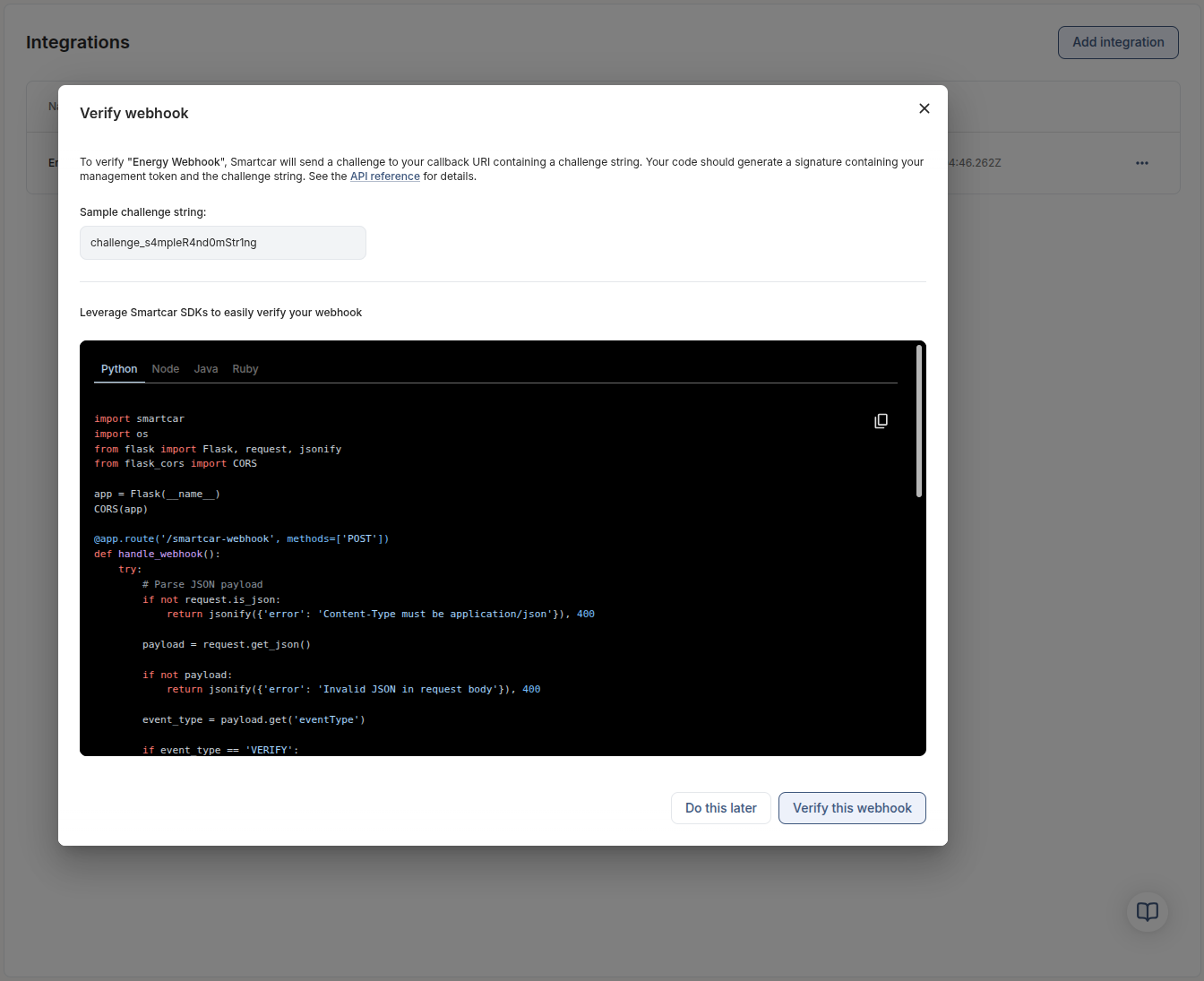 When you verify a webhook, you'll see a guided modal with a sample challenge string, copy-ready SDK snippets (Python, Node, Java, Ruby), and inline instructions for hashing the `application_management_token` plus challenge.
When your server responds with your webhook verification, you'll see the response that Smartcar received compared to the expected hash output.
When you verify a webhook, you'll see a guided modal with a sample challenge string, copy-ready SDK snippets (Python, Node, Java, Ruby), and inline instructions for hashing the `application_management_token` plus challenge.
When your server responds with your webhook verification, you'll see the response that Smartcar received compared to the expected hash output.
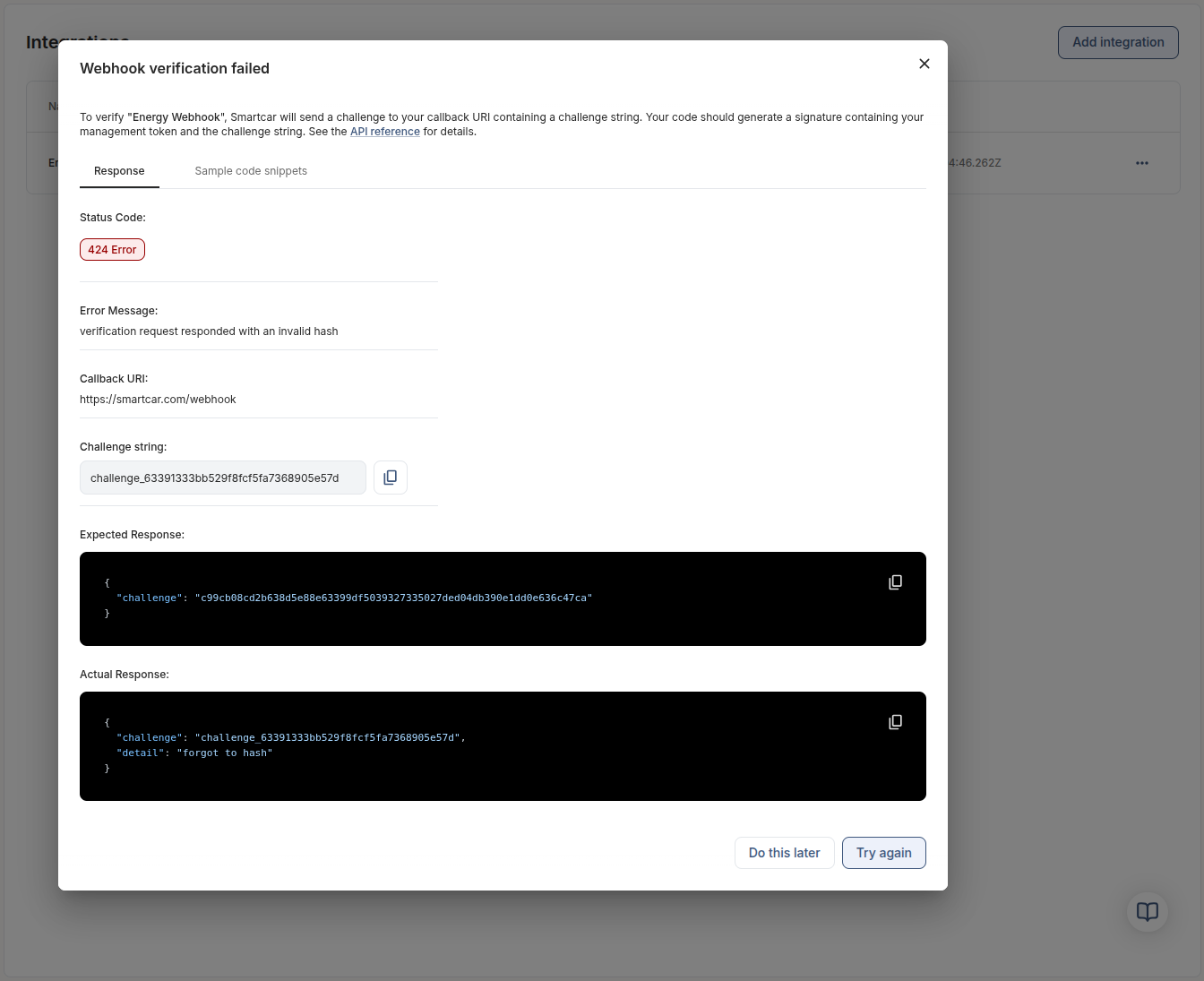 If the verification fails, the new response tab surfaces the HTTP status, challenge string, expected hash output, and the payload Smartcar received so you can immediately compare and retry. This feedback loop removes trial-and-error, shortens onboarding for new teams, and ensures your webhook endpoint is producing the correct `SC-Signature` before you start ingesting production signals.
**Get started**
* Head to the [Smartcar Dashboard](https://dashboard.smartcar.com/integrations) and select your webhook integration to launch the verifier.
* Follow the updated [Payload verification guide](/integrations/webhooks/payload-verification) to reproduce the same HMAC calculation server-side.
* After verification succeeds, wire up your [webhook receiver tutorial](/getting-started/tutorials/webhook-receiver-recipe) or call the [webhook overview](/integrations/webhooks/overview) docs for deployment best practices.
## TypeScript Webhook Recipe Now Available
If the verification fails, the new response tab surfaces the HTTP status, challenge string, expected hash output, and the payload Smartcar received so you can immediately compare and retry. This feedback loop removes trial-and-error, shortens onboarding for new teams, and ensures your webhook endpoint is producing the correct `SC-Signature` before you start ingesting production signals.
**Get started**
* Head to the [Smartcar Dashboard](https://dashboard.smartcar.com/integrations) and select your webhook integration to launch the verifier.
* Follow the updated [Payload verification guide](/integrations/webhooks/payload-verification) to reproduce the same HMAC calculation server-side.
* After verification succeeds, wire up your [webhook receiver tutorial](/getting-started/tutorials/webhook-receiver-recipe) or call the [webhook overview](/integrations/webhooks/overview) docs for deployment best practices.
## TypeScript Webhook Recipe Now Available
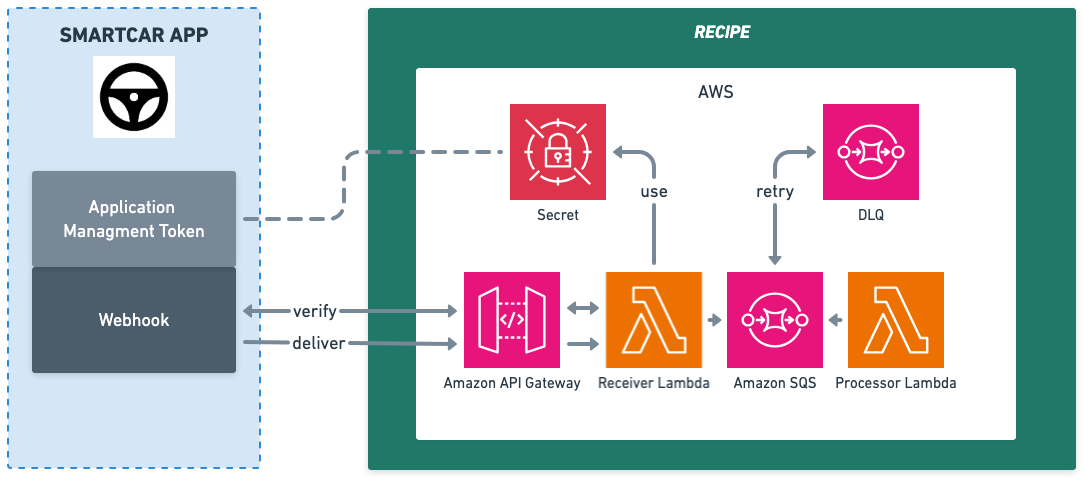 Deploy production-ready webhook receivers in minutes with our new [TypeScript Webhook Recipe](https://github.com/smartcar/typescript-webhook-recipe)! This AWS serverless template provides everything you need to handle Smartcar webhooks at scale:
* **Complete Infrastructure**: Lambda + API Gateway + SQS with AWS CDK
* **Built-in Validation**: Automatic webhook verification and payload validation
* **Error Handling**: Dead letter queues and retry logic for reliability
* **Production Ready**: CloudWatch monitoring, IAM security, and auto-scaling
* **Developer Friendly**: TypeScript types and comprehensive documentation
The recipe eliminates the complexity of building webhook infrastructure from scratch, letting you focus on your business logic. Perfect for new webhook implementations or teams wanting to deploy quickly without infrastructure overhead.
**Get started**: [Webhook Receiver Recipe Documentation](/getting-started/tutorials/webhook-receiver-recipe) | [GitHub Repository](https://github.com/smartcar/typescript-webhook-recipe)
## Battery Capacity Selection in the Smartcar Connect Flow
Deploy production-ready webhook receivers in minutes with our new [TypeScript Webhook Recipe](https://github.com/smartcar/typescript-webhook-recipe)! This AWS serverless template provides everything you need to handle Smartcar webhooks at scale:
* **Complete Infrastructure**: Lambda + API Gateway + SQS with AWS CDK
* **Built-in Validation**: Automatic webhook verification and payload validation
* **Error Handling**: Dead letter queues and retry logic for reliability
* **Production Ready**: CloudWatch monitoring, IAM security, and auto-scaling
* **Developer Friendly**: TypeScript types and comprehensive documentation
The recipe eliminates the complexity of building webhook infrastructure from scratch, letting you focus on your business logic. Perfect for new webhook implementations or teams wanting to deploy quickly without infrastructure overhead.
**Get started**: [Webhook Receiver Recipe Documentation](/getting-started/tutorials/webhook-receiver-recipe) | [GitHub Repository](https://github.com/smartcar/typescript-webhook-recipe)
## Battery Capacity Selection in the Smartcar Connect Flow
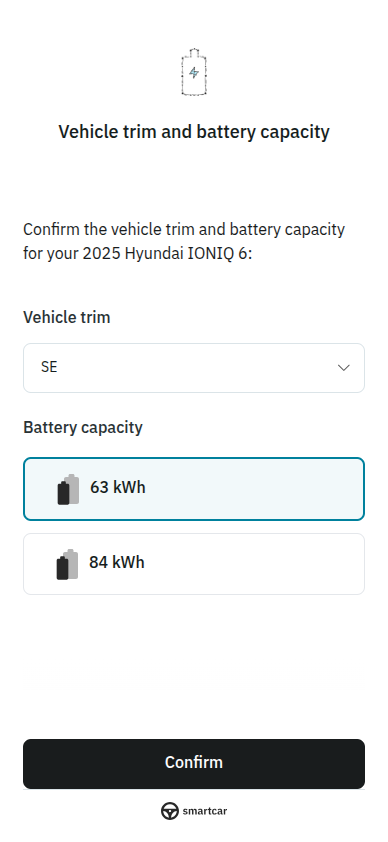 When you request the `read_battery` permission and Smartcar detects multiple possible battery capacity matches for a vehicle, users will now be automatically prompted to select their battery capacity during the Connect flow.
This streamlined experience eliminates the need for developers to prompt users or source the battery capacity selection from other sources. This step ensures that battery capacity data is available immediately after vehicle connection if Smartcar is not able to identify it.
Read more about the [User Selected Battery Capacity](/connect/user-selected-batcap).
## Smartcar Partners with Mercedes-Benz Connectivity Services GmbH!
We are excited to announce our partnership with Mercedes-Benz Connectivity Services GmbH, expanding seamless access to connected vehicle data for developers and businesses across Europe.
This integration enables developers to build innovative applications using data from Mercedes-Benz vehicles, including popular models such as the A-Class, C-Class, E-Class, S-Class, GLA, GLC, and more.
With this partnership, Smartcar customers can leverage secure, reliable, and real-time access to vehicle data for a wide range of use cases, from fleet management to mobility services.
Read more about this partnership and its impact in our [blog post](https://smartcar.com/blog/smartcar-partners-with-mercedes-benz-connectivity-services-gmbh).
## Introducing the new Smartcar Platform!
When you request the `read_battery` permission and Smartcar detects multiple possible battery capacity matches for a vehicle, users will now be automatically prompted to select their battery capacity during the Connect flow.
This streamlined experience eliminates the need for developers to prompt users or source the battery capacity selection from other sources. This step ensures that battery capacity data is available immediately after vehicle connection if Smartcar is not able to identify it.
Read more about the [User Selected Battery Capacity](/connect/user-selected-batcap).
## Smartcar Partners with Mercedes-Benz Connectivity Services GmbH!
We are excited to announce our partnership with Mercedes-Benz Connectivity Services GmbH, expanding seamless access to connected vehicle data for developers and businesses across Europe.
This integration enables developers to build innovative applications using data from Mercedes-Benz vehicles, including popular models such as the A-Class, C-Class, E-Class, S-Class, GLA, GLC, and more.
With this partnership, Smartcar customers can leverage secure, reliable, and real-time access to vehicle data for a wide range of use cases, from fleet management to mobility services.
Read more about this partnership and its impact in our [blog post](https://smartcar.com/blog/smartcar-partners-with-mercedes-benz-connectivity-services-gmbh).
## Introducing the new Smartcar Platform!
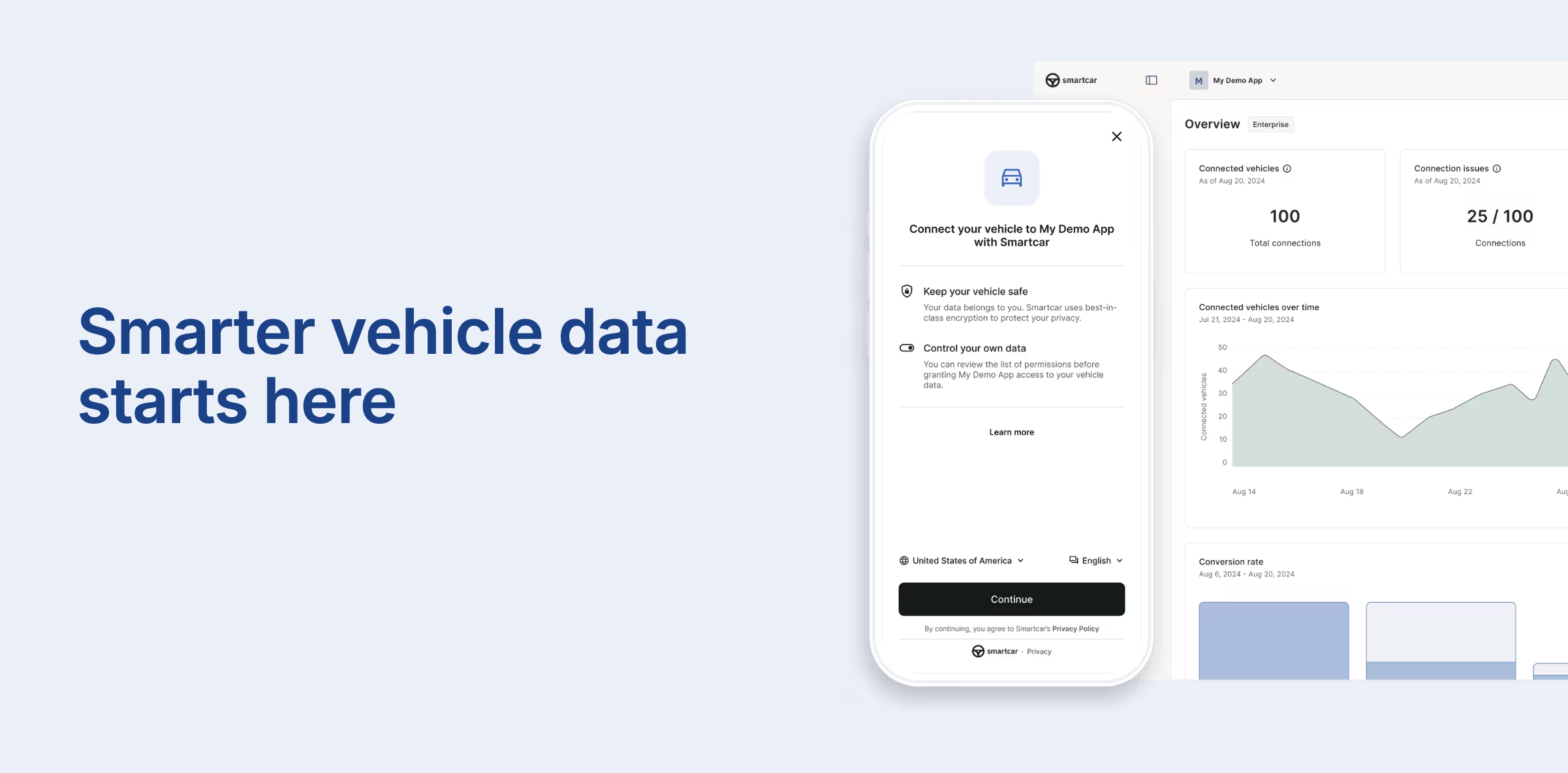 We are excited to announce the launch of the new Smartcar Platform, designed to provide a more reliable and efficient way to access vehicle data. With our new [webhook integration](/integrations/webhooks/overview) and [API](/api-reference/intro), developers can now receive vehicle data at higher frequencies and with improved reliability.
For all use cases, Smartcar can deliver data as it detects changes based on our new standardized Signal Schema while avoiding unnecessary polling. With over 80 signals available, developers can access a wide range of vehicle data to build innovative applications.
Getting started with Smartcar is now even easier. [Configure](/getting-started/configure-application) your app, [Connect](/getting-started/connect-vehicles) vehicles, and start receiving data via [webhooks](/integrations/webhooks/overview) in just a few minutes.
To get started with the new webhooks, check out our [Getting Started guide](/getting-started/introduction) and [Webhook integration overview](/integrations/webhooks/overview).
These new features are now available to all new customers. Existing customers can reach out to their account manager or contact our support team at [support@smartcar.com](mailto:support@smartcar.com)
## Smartcar Partners with Ford in Europe!
We are excited to announce the launch of the new Smartcar Platform, designed to provide a more reliable and efficient way to access vehicle data. With our new [webhook integration](/integrations/webhooks/overview) and [API](/api-reference/intro), developers can now receive vehicle data at higher frequencies and with improved reliability.
For all use cases, Smartcar can deliver data as it detects changes based on our new standardized Signal Schema while avoiding unnecessary polling. With over 80 signals available, developers can access a wide range of vehicle data to build innovative applications.
Getting started with Smartcar is now even easier. [Configure](/getting-started/configure-application) your app, [Connect](/getting-started/connect-vehicles) vehicles, and start receiving data via [webhooks](/integrations/webhooks/overview) in just a few minutes.
To get started with the new webhooks, check out our [Getting Started guide](/getting-started/introduction) and [Webhook integration overview](/integrations/webhooks/overview).
These new features are now available to all new customers. Existing customers can reach out to their account manager or contact our support team at [support@smartcar.com](mailto:support@smartcar.com)
## Smartcar Partners with Ford in Europe!
 Smartcar is thrilled to announce our partnership with Ford in Europe, enabling developers to access vehicle data from millions of Ford vehicles across the continent.
This upcoming integration will give developers seamless access to vehicle data from models including the Mustang Mach-E, E-Transit, Puma, Fiesta, and Kuga.
Read more about this exciting partnership in our [blog post](https://smartcar.com/blog/smartcar-partners-with-ford-to-expand-access-to-connected-vehicle-apis?utm_source=docs\&utm_medium=changelog).
## Rivian Commands Now Available!
Smartcar is thrilled to announce our partnership with Ford in Europe, enabling developers to access vehicle data from millions of Ford vehicles across the continent.
This upcoming integration will give developers seamless access to vehicle data from models including the Mustang Mach-E, E-Transit, Puma, Fiesta, and Kuga.
Read more about this exciting partnership in our [blog post](https://smartcar.com/blog/smartcar-partners-with-ford-to-expand-access-to-connected-vehicle-apis?utm_source=docs\&utm_medium=changelog).
## Rivian Commands Now Available!
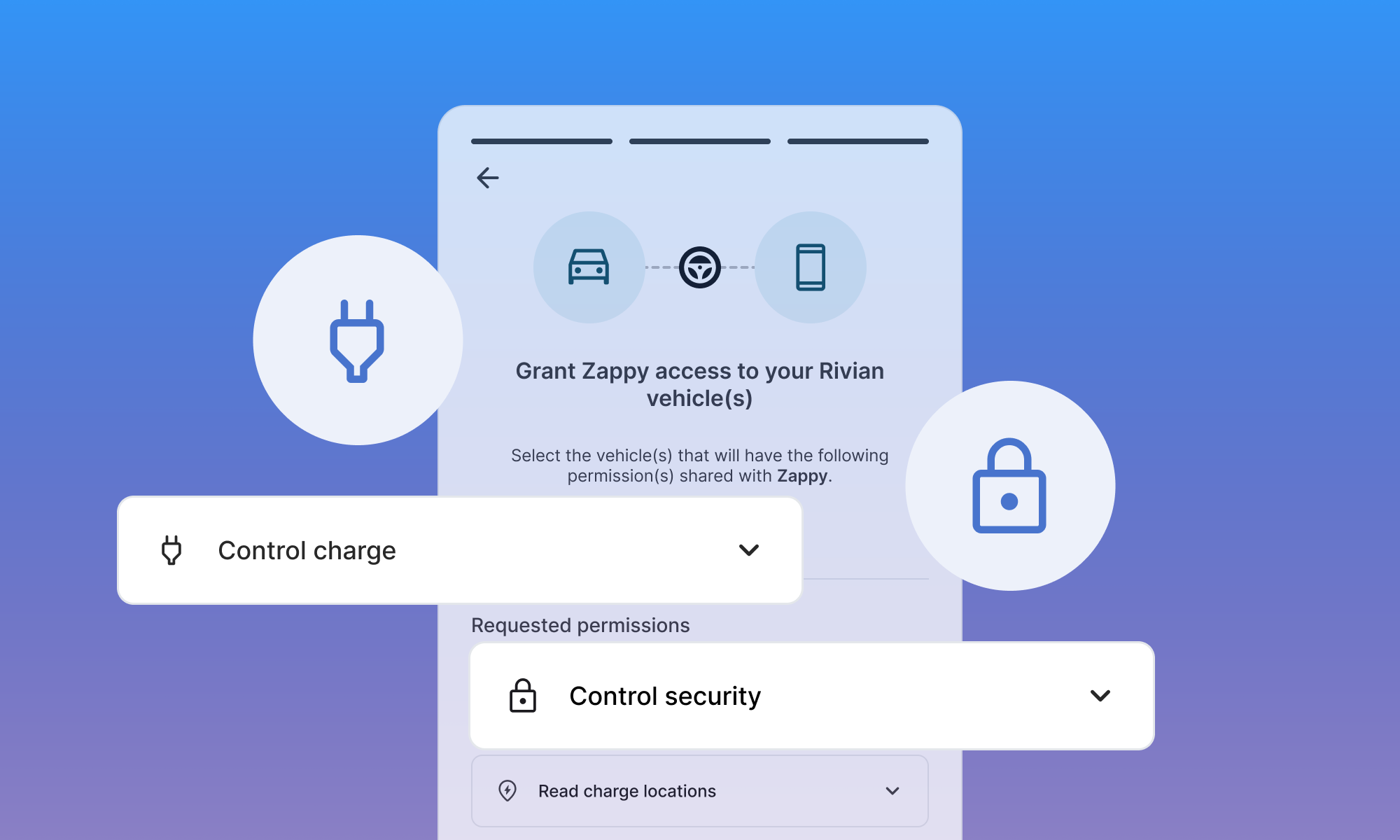 You can now use the Smartcar API to send commands--such as lock, unlock, and start/stop charge--to Rivian vehicles!
When requesting command permissions (like `control_security` or `control_charge`), Rivian owners will be prompted to pair their phone with their vehicle. After successful pairing, your application will be able to issue commands to the connected Rivian.
For step-by-step instructions, see our [Rivian Bluetooth Pairing guide](/connect/other-actions/rivian-bluetooth-pairing).
> **Note:** Read data permissions (such as `read_location` or `read_charge`) do not require Bluetooth pairing.
>
> Smartcar mobile SDKs for iOS and Android are required for Bluetooth pairing.
## Hyundai Lock and Unlock now available!
You can now use the Smartcar API to send commands--such as lock, unlock, and start/stop charge--to Rivian vehicles!
When requesting command permissions (like `control_security` or `control_charge`), Rivian owners will be prompted to pair their phone with their vehicle. After successful pairing, your application will be able to issue commands to the connected Rivian.
For step-by-step instructions, see our [Rivian Bluetooth Pairing guide](/connect/other-actions/rivian-bluetooth-pairing).
> **Note:** Read data permissions (such as `read_location` or `read_charge`) do not require Bluetooth pairing.
>
> Smartcar mobile SDKs for iOS and Android are required for Bluetooth pairing.
## Hyundai Lock and Unlock now available!
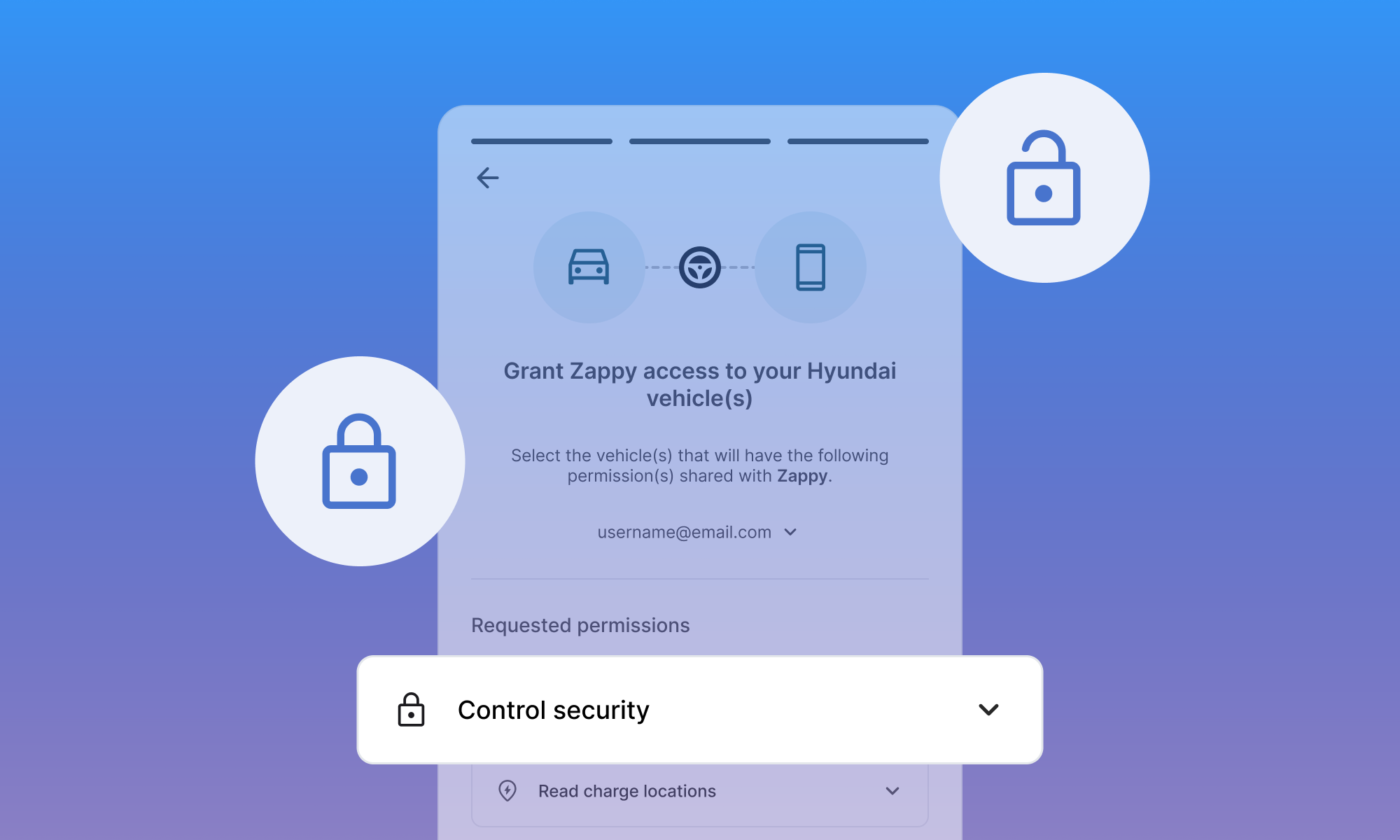 You can now lock and unlock Hyundai vehicles using the same standard Smartcar API. This new feature enables remote control of vehicle doors for supported Hyundai models, making it easier to build secure and convenient experiences for your users.
For more details on how to use this capability, see our [API reference](/api-reference/control-lock-unlock).
## Webhook Logs Now Available in Dashboard
You can now view logs for your webhooks directly in the Smartcar Dashboard, alongside your API request logs. This update gives you greater visibility into webhook deliveries, making it easier to monitor, debug, and ensure successful integrations.
To see your webhook logs in action, head over to the [Smartcar Dashboard](https://dashboard.smartcar.com/logs?tab=webhooks).
## New Dashboard Overview Page
You can now lock and unlock Hyundai vehicles using the same standard Smartcar API. This new feature enables remote control of vehicle doors for supported Hyundai models, making it easier to build secure and convenient experiences for your users.
For more details on how to use this capability, see our [API reference](/api-reference/control-lock-unlock).
## Webhook Logs Now Available in Dashboard
You can now view logs for your webhooks directly in the Smartcar Dashboard, alongside your API request logs. This update gives you greater visibility into webhook deliveries, making it easier to monitor, debug, and ensure successful integrations.
To see your webhook logs in action, head over to the [Smartcar Dashboard](https://dashboard.smartcar.com/logs?tab=webhooks).
## New Dashboard Overview Page
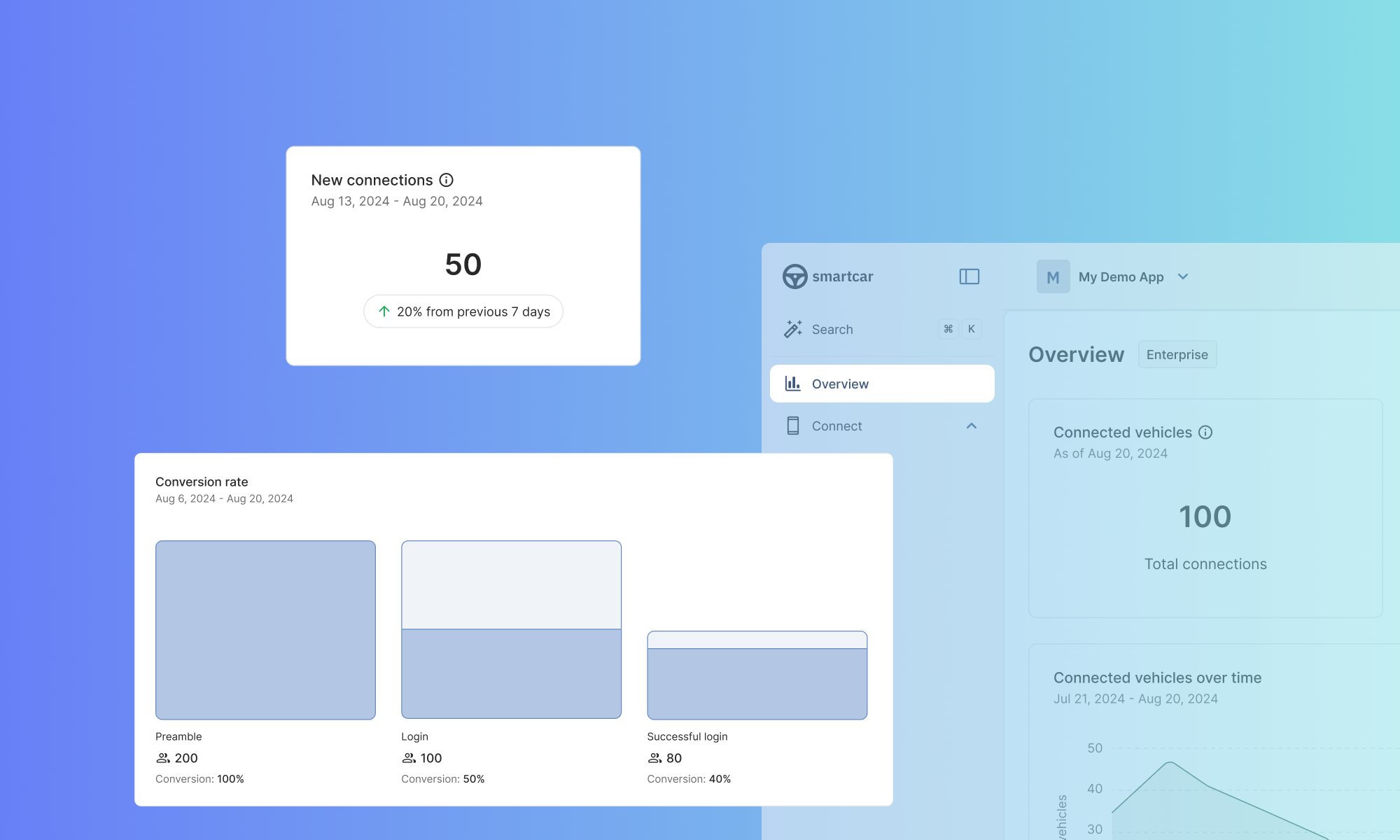 Our new Dashboard overview page offers a comprehensive snapshot of your application's performance at a glance. Now, you can quickly visualize:
* Total vehicle connections
* New connections in the last 7 days
* Request trends over time
* Conversion rates
* Top five vehicle brands connected to your application
This update is designed to help you monitor key metrics effortlessly.
## Virtual Keys installation Is Now Supported in Connect
Smartcar now provides detailed steps for adding and managing Virtual Keys during the connection flow. Virtual Keys are required for third-party applications to issue commands to Tesla vehicles and are the preferred method for accessing data.
Our new Dashboard overview page offers a comprehensive snapshot of your application's performance at a glance. Now, you can quickly visualize:
* Total vehicle connections
* New connections in the last 7 days
* Request trends over time
* Conversion rates
* Top five vehicle brands connected to your application
This update is designed to help you monitor key metrics effortlessly.
## Virtual Keys installation Is Now Supported in Connect
Smartcar now provides detailed steps for adding and managing Virtual Keys during the connection flow. Virtual Keys are required for third-party applications to issue commands to Tesla vehicles and are the preferred method for accessing data.
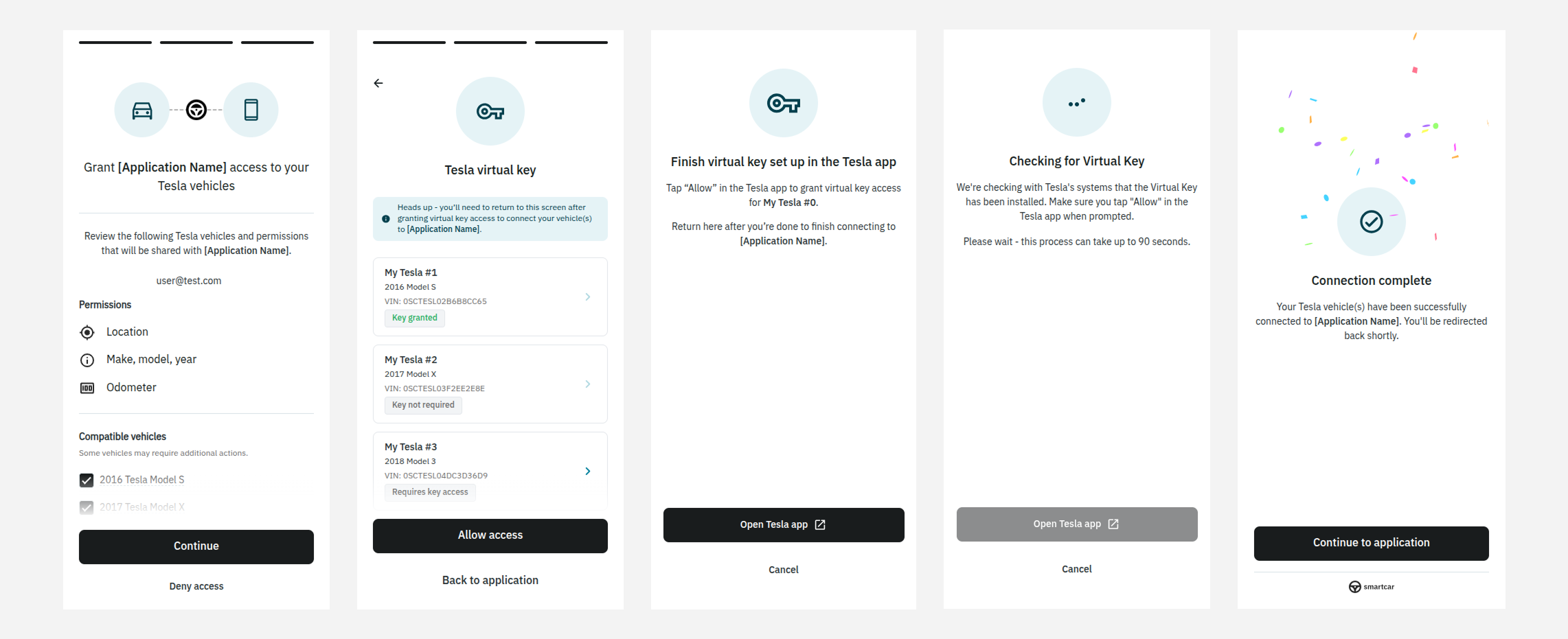 For more details, visit the [Virtual Key documentation](/help/oem-integrations/tesla/virtual-key-tesla).
## atHome signal is now available!
For more details, visit the [Virtual Key documentation](/help/oem-integrations/tesla/virtual-key-tesla).
## atHome signal is now available!
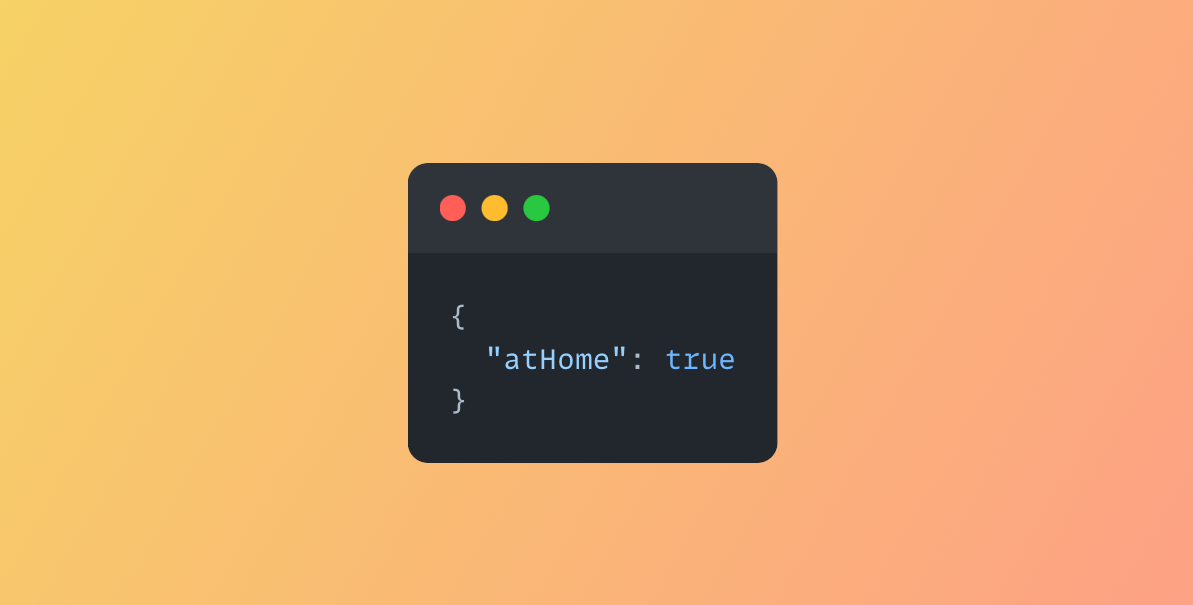 Smartcar now supports a new vehicle signal `atHome` that returns true or false if a vehicle is at the configured home location. This signal is currently available for Tesla vehicles capable of streaming via [this endpoint](/api-reference/tesla/get-ext-vehicle-info).
## Our New Support Features Are Live!
Smartcar now supports a new vehicle signal `atHome` that returns true or false if a vehicle is at the configured home location. This signal is currently available for Tesla vehicles capable of streaming via [this endpoint](/api-reference/tesla/get-ext-vehicle-info).
## Our New Support Features Are Live!
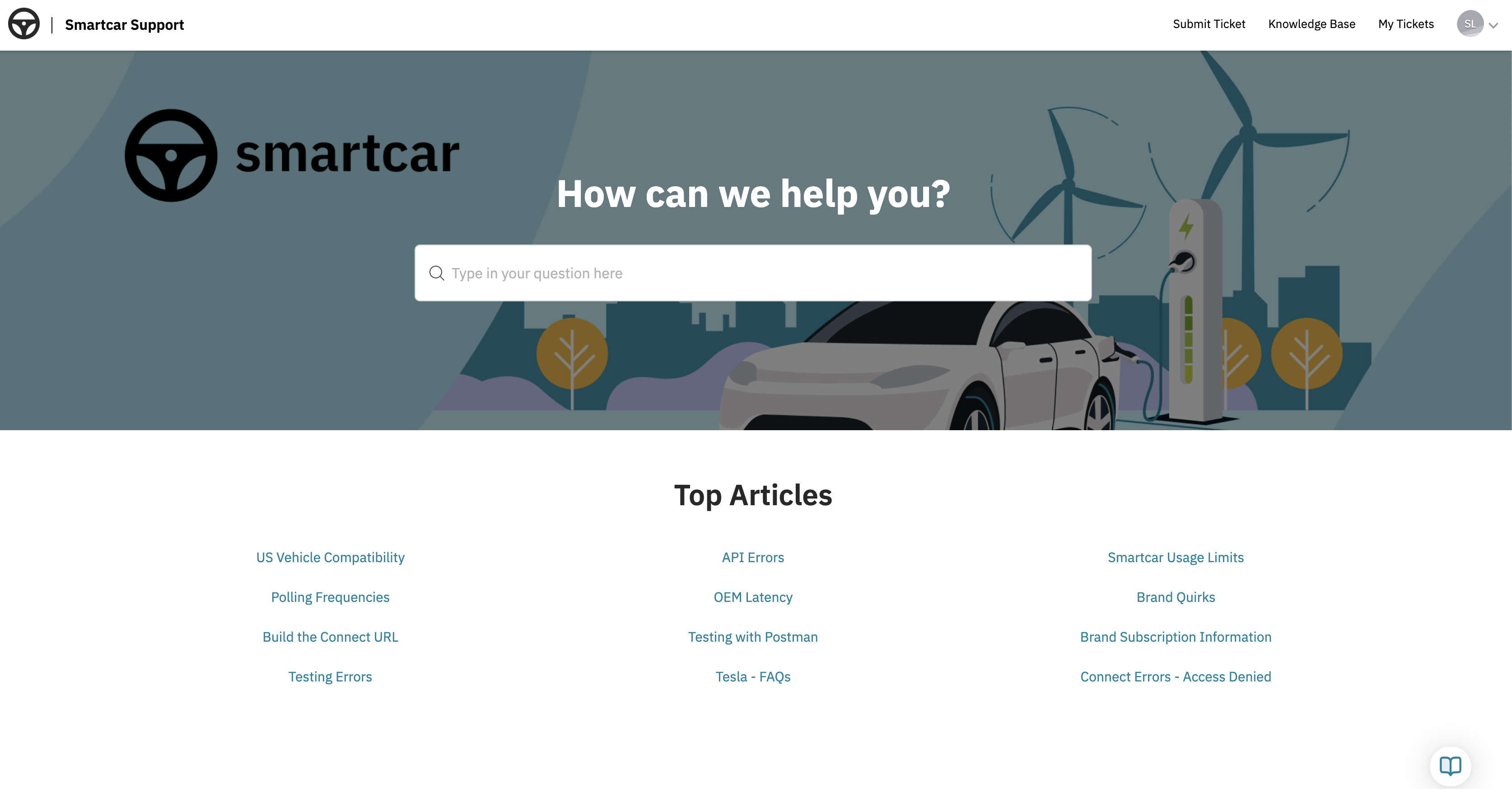 We're excited to share that our new support experience is now available. These updates are designed to make it easier and faster to get the help you need through self-service tools, AI-powered assistance, and improved visibility into your support history.
**Customer Support Portal** *(Available to paid customers via the Smartcar Dashboard)*
Your new central hub for all support-related needs:
* Browse the **Knowledge Base** for helpful articles, guides, and troubleshooting tips
* Submit new support requests through a user-friendly form
* View and update **open tickets**, track past communications, and receive timely updates
* Get help fast with our **AI-powered chat agent**, available 24/7
**Enhanced Slack Support** *(For eligible plans)*
Our upgraded Slack support includes:
* AI-powered answers to common questions directly in your Slack channel
* Ability to create and track support tickets without leaving Slack
* One-click access to the Customer Support Portal
* Real-time updates and faster response workflows
For more information about what's included in your current plan, please reach out to your account manager or contact us at [**support@smartcar.com**](mailto:support@smartcar.com).
For step-by-step instructions on how to use the new features, check out our documentation [here](https://smartcar.com/docs/help/accessing-support-center).
## Support for Single Sign-on (SSO)
We're excited to share that our new support experience is now available. These updates are designed to make it easier and faster to get the help you need through self-service tools, AI-powered assistance, and improved visibility into your support history.
**Customer Support Portal** *(Available to paid customers via the Smartcar Dashboard)*
Your new central hub for all support-related needs:
* Browse the **Knowledge Base** for helpful articles, guides, and troubleshooting tips
* Submit new support requests through a user-friendly form
* View and update **open tickets**, track past communications, and receive timely updates
* Get help fast with our **AI-powered chat agent**, available 24/7
**Enhanced Slack Support** *(For eligible plans)*
Our upgraded Slack support includes:
* AI-powered answers to common questions directly in your Slack channel
* Ability to create and track support tickets without leaving Slack
* One-click access to the Customer Support Portal
* Real-time updates and faster response workflows
For more information about what's included in your current plan, please reach out to your account manager or contact us at [**support@smartcar.com**](mailto:support@smartcar.com).
For step-by-step instructions on how to use the new features, check out our documentation [here](https://smartcar.com/docs/help/accessing-support-center).
## Support for Single Sign-on (SSO)
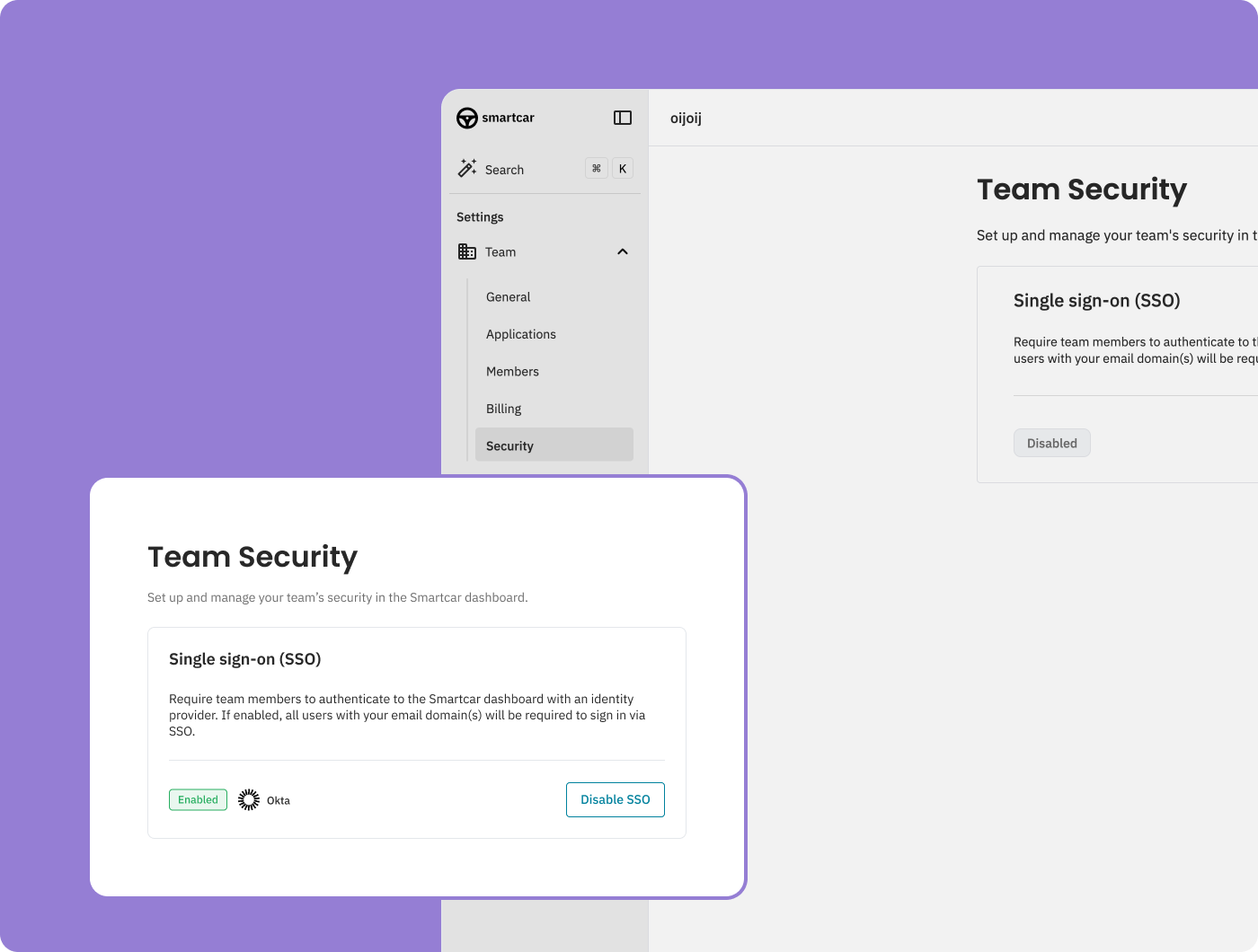 Single Sign-On (SSO) is now available for teams on an Enterprise plan. To get started, reach out to your account manager to have it enabled. For implementation details and setup instructions, check out our [SSO documentation](/getting-started/dashboard/single-sign-on).
## User Selected Battery Capacity
Single Sign-On (SSO) is now available for teams on an Enterprise plan. To get started, reach out to your account manager to have it enabled. For implementation details and setup instructions, check out our [SSO documentation](/getting-started/dashboard/single-sign-on).
## User Selected Battery Capacity
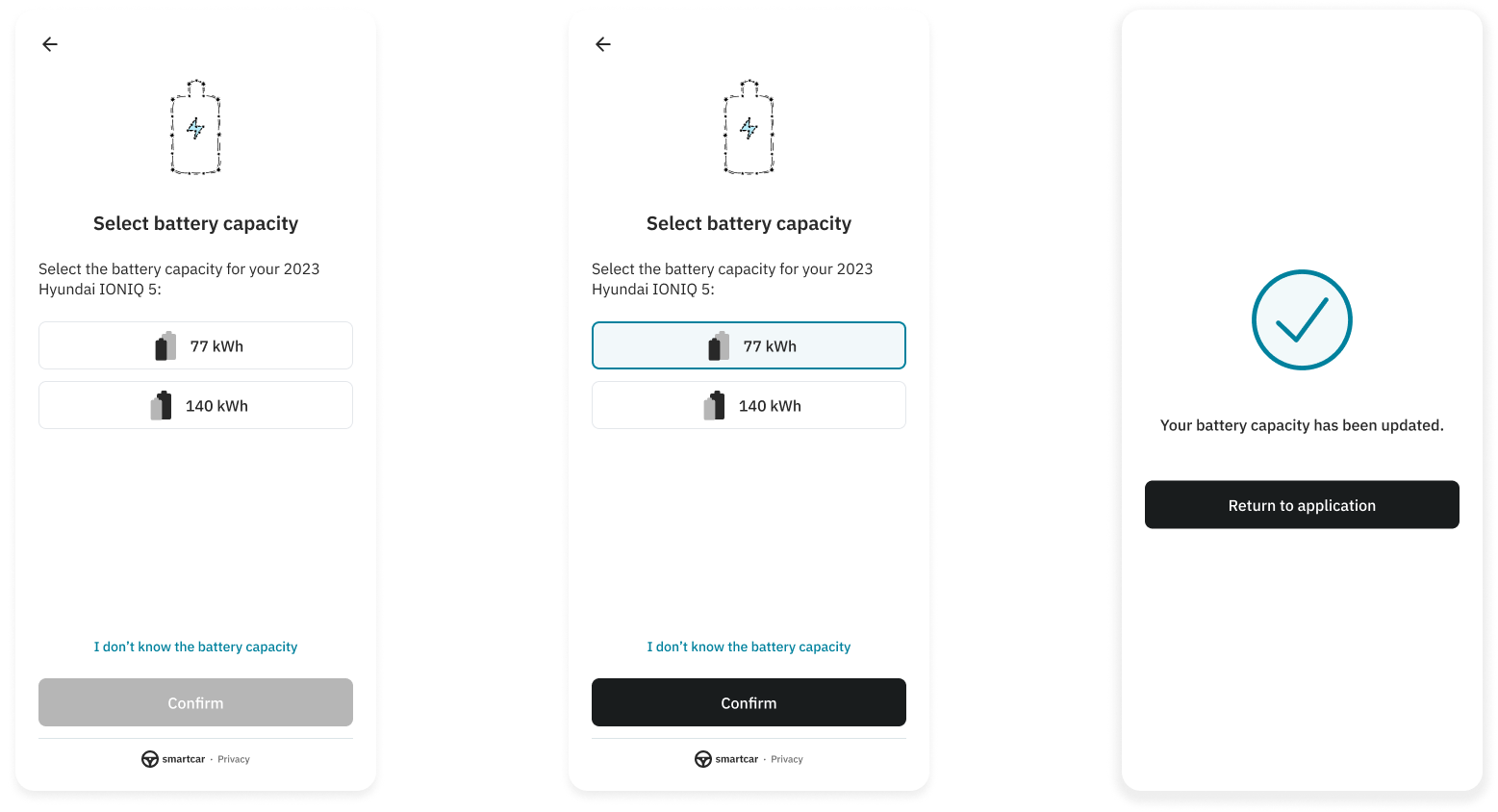
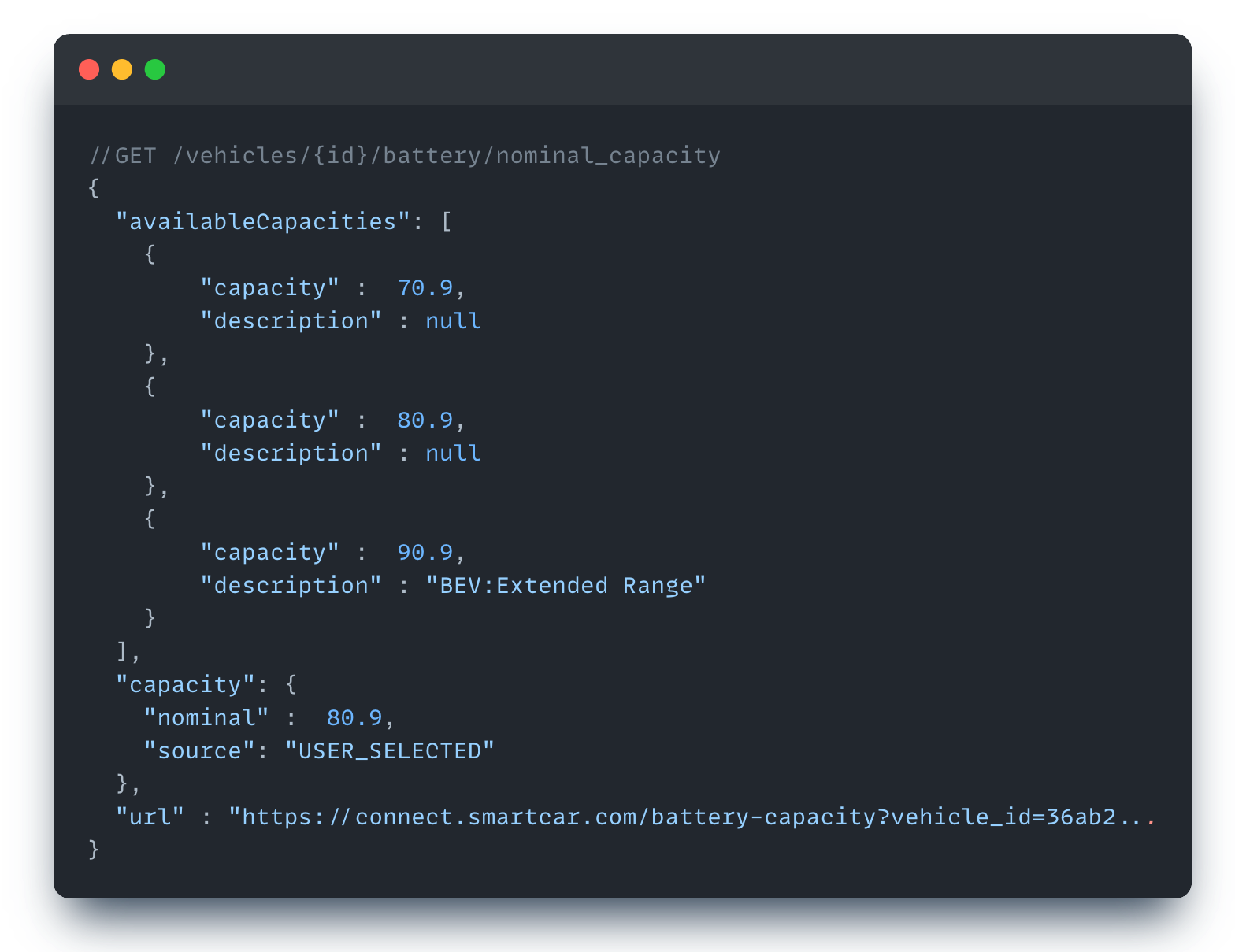 Developers can now redirect vehicle owners to a Smartcar Connect url where they can select the [battery capacity](/api-reference/get-nominal-capacity) of their vehicle for cases where the battery capacity cannot be accurately determined. This can occur when vehicle owners purchase extension packs, or software upgrades specific to their vehicle. When a user selects an option, Smartcar will return this value with `USER_SELECTED` as the source.
## Diagnostics Webhooks, DTSs, and System Status
Smartcar now provides Diagnostic Webhooks, DTCs, and System Status vehicle data for an [initial set of brands](https://smartcar.com/product/compatible-vehicles) with more brands added in the future.
## Support for Simplified Chinese
Developers can now redirect vehicle owners to a Smartcar Connect url where they can select the [battery capacity](/api-reference/get-nominal-capacity) of their vehicle for cases where the battery capacity cannot be accurately determined. This can occur when vehicle owners purchase extension packs, or software upgrades specific to their vehicle. When a user selects an option, Smartcar will return this value with `USER_SELECTED` as the source.
## Diagnostics Webhooks, DTSs, and System Status
Smartcar now provides Diagnostic Webhooks, DTCs, and System Status vehicle data for an [initial set of brands](https://smartcar.com/product/compatible-vehicles) with more brands added in the future.
## Support for Simplified Chinese
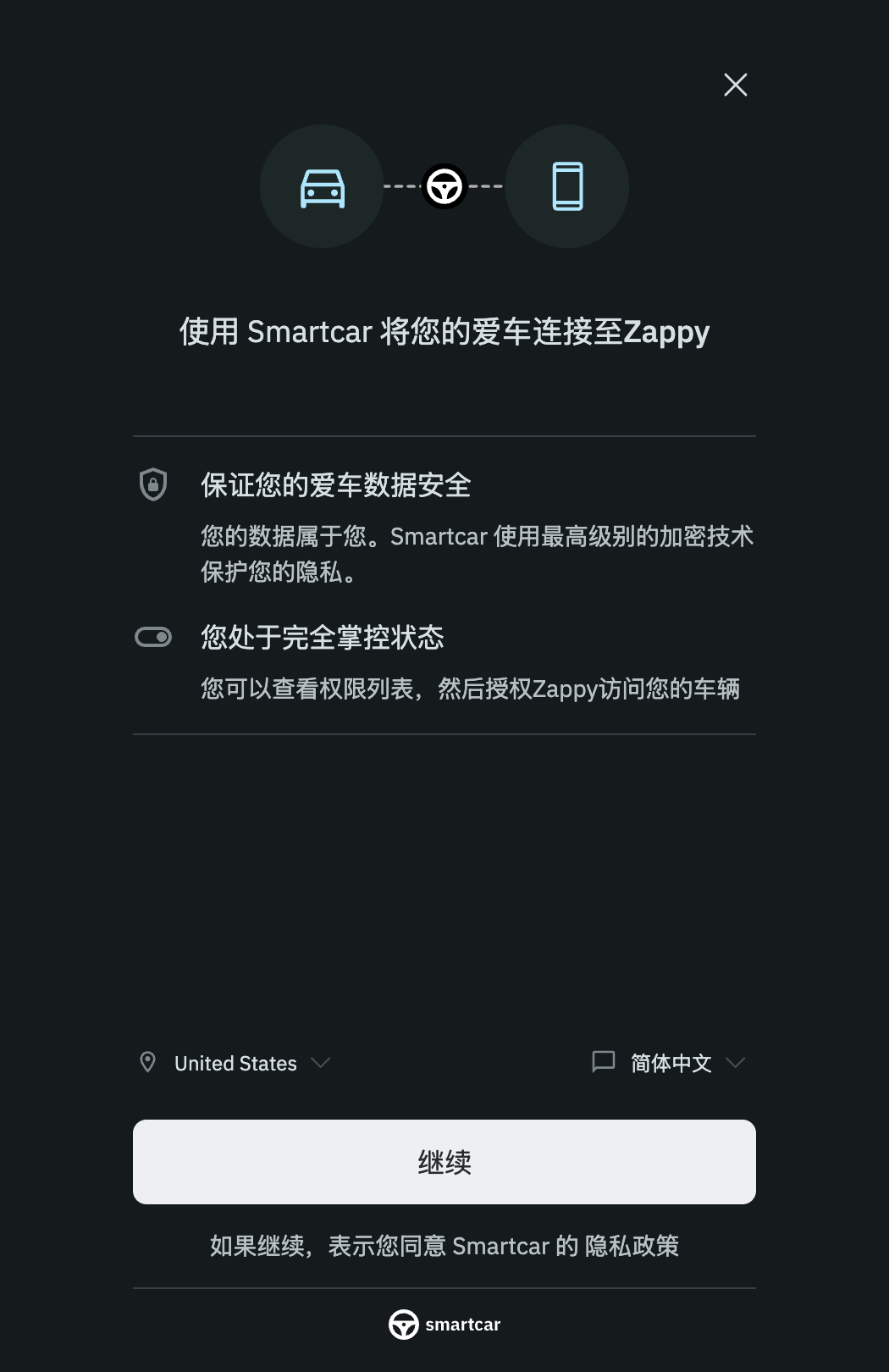 Vehicle owners can now select Simplified Chinese as they go through the Smartcar Connect flow to connect their cars.
## Tesla Telemetry API
Smartcar natively supports Tesla's Telemetry API as the default mechanism for retrieving data from Tesla vehicles out of the box and without any configuration from developers. Tesla's Telemetry API is the most efficient and effective way of gathering data from Tesla vehicles. It allows vehicles to stream data directly to Smartcar, eliminating the need to poll Tesla servers. This prevents unnecessary vehicle wakes and battery drain.
## Smartcar MFA
When a vehicle owner attempts to login to their OEM Connected Services Account and they do not have MFA enabled, Smartcar customers can enable this feature to enforce MFA verification for extra security. If you don't see this option in the Smartcar dashboard, contact [support@smartcar.com](mailto:support@smartcar.com) to get access to this feature.
## New Billing page in Dashboard
Vehicle owners can now select Simplified Chinese as they go through the Smartcar Connect flow to connect their cars.
## Tesla Telemetry API
Smartcar natively supports Tesla's Telemetry API as the default mechanism for retrieving data from Tesla vehicles out of the box and without any configuration from developers. Tesla's Telemetry API is the most efficient and effective way of gathering data from Tesla vehicles. It allows vehicles to stream data directly to Smartcar, eliminating the need to poll Tesla servers. This prevents unnecessary vehicle wakes and battery drain.
## Smartcar MFA
When a vehicle owner attempts to login to their OEM Connected Services Account and they do not have MFA enabled, Smartcar customers can enable this feature to enforce MFA verification for extra security. If you don't see this option in the Smartcar dashboard, contact [support@smartcar.com](mailto:support@smartcar.com) to get access to this feature.
## New Billing page in Dashboard
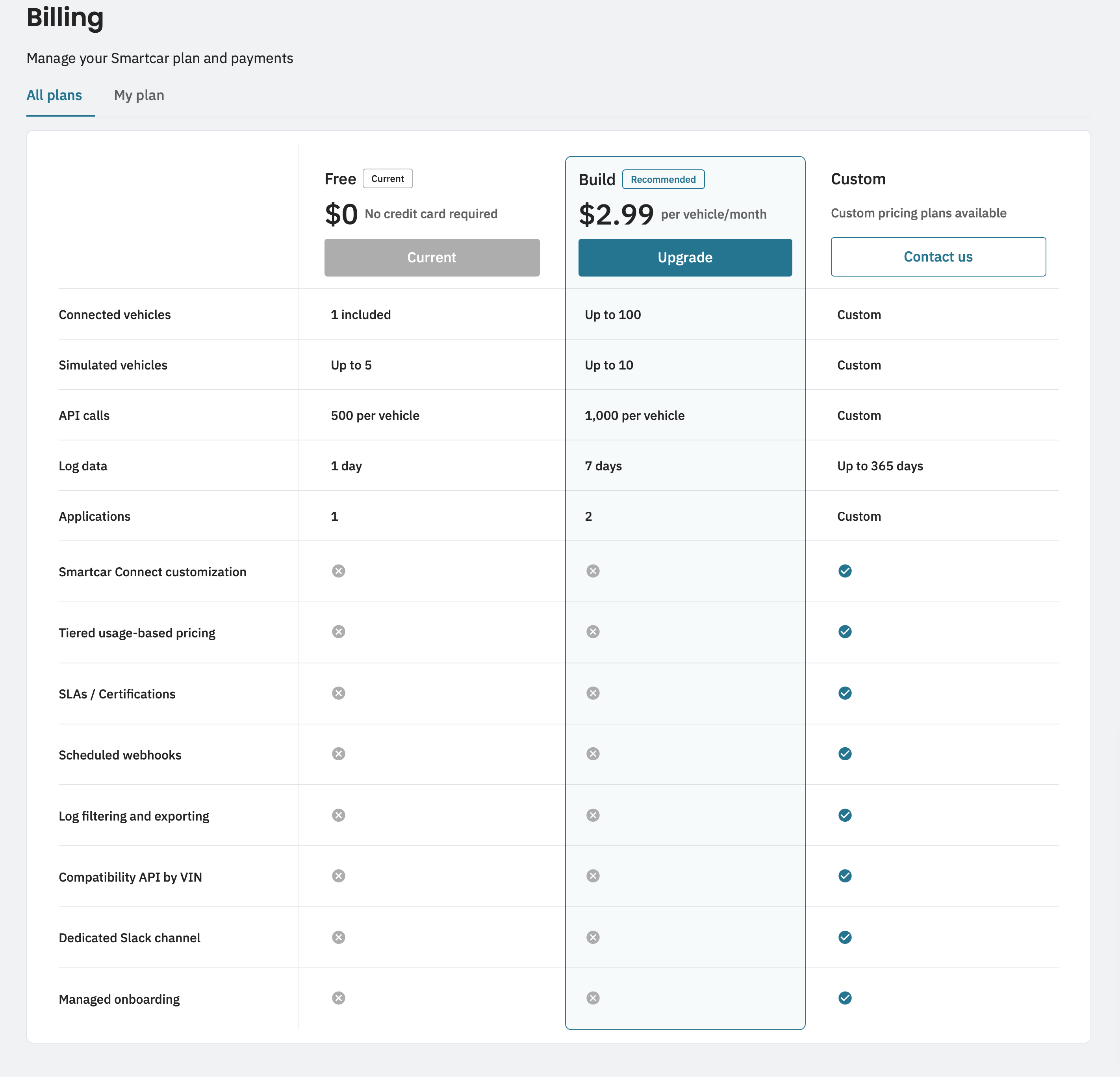 This new page provides more visibility and the ability to update your billing information, view past invoices, and view your plan features and available upgrade options.