> ## Documentation Index
> Fetch the complete documentation index at: https://smartcar.com/docs/llms.txt
> Use this file to discover all available pages before exploring further.
# Battery Capacity
> Returns a list of nominal rated battery capacities for a vehicle.
The Vehicles API v2.0 will be deprecated by **Q4 of 2026**. We recommend migrating to the [latest version](/api-reference/intro) as soon as possible to ensure continued support and access to new features.
This endpoint is only available for US and European based vehicles. Please refer to [this page](/api-reference/evs/get-battery-capacity) if you need battery capacity for Canadian based vehicles for the time being.
## Permission
`read_battery`
## Request
**Path**
```bash cURL theme={null}
curl "https://api.smartcar.com/v2.0/vehicles/{id}/battery/nominal_capacity" \
-H "Authorization: Bearer {token}" \
-X "GET"
```
## Response
An array of capacities Objects.
The rated nominal capacity for the vehicle's battery.
A description of the uniqueness for the nominal capacity and engine type of the vehicle in the form `{ENGINE_TYPE}:{TRIM}`, for example `"BEV:Extended Range"`.
Engine type can be one of `BEV` or `PHEV`.
The rated nominal capacity for the vehicle's battery.
Indicates if this capacity was determined by a user or Smartcar.
Options are `USER_SELECTED` or `SMARTCAR`.
A URL that will launch the flow for a vehicle owner to specify the correct
battery capacity for a vehicle. **Please ensure you append a
redirect URI** for us to send a response to once the user exits the flow.
Please see [this article](/connect/user-selected-batcap) on how to handle the URL callback.
```json Response Example theme={null}
{
"availableCapacities": [
{
"capacity" : 70.9,
"description" : null
},
{
"capacity" : 80.9,
"description" : null
},
{
"capacity" : 90.9,
"description" : "BEV:Extended Range"
}
],
"capacity": {
"nominal" : 80.9,
"source": "USER_SELECTED"
},
"url" : "https://connect.smartcar.com/battery-capacity?vehicle_id=36ab27d0-fd9d-4455-823a-ce30af709ffc&client_id=8229df9f-91a0-4ff0-a1ae-a1f38ee24d07&token=90abecb6-e7ab-4b85-864a-e1c8bf67f2ad&response_type=vehicle_id&redirect_uri="
}
```
### Case 1: Smartcar has determined the battery capacity
```json Single capacity theme={null}
{
"availableCapacities": [
{
"capacity" : 70.9,
"description" : null
}
],
"capacity": {
"nominal" : 70.9,
"source": "SMARTCAR"
},
"url" : null
}
```
### Case 2: Unable to determine the battery capacity
```json Multiple capacities theme={null}
{
"availableCapacities": [
{
"capacity" : 70.9,
"description" : null
},
{
"capacity" : 80.9,
"description" : null
},
{
"capacity" : 90.9,
"description" : "BEV:Extended Range"
}
],
"capacity": null,
"url" : "https://connect.smartcar.com/battery-capacity?vehicle_id=36ab27d0-fd9d-4455-823a-ce30af709ffc&client_id=8229df9f-91a0-4ff0-a1ae-a1f38ee24d07&token=90abecb6-e7ab-4b85-864a-e1c8bf67f2ad&response_type=vehicle_id&redirect_uri="
}
```
### Case 3: User selected battery capacity
Smartcar will sometimes return an `availableCapacities` object along side a Connect URL you can use to prompt users to select the battery capacity of their vehicle. This can occur when an accurate match could not be found, or vehicle owners purchased extension packs, or software upgrades specific to their vehicle.
When you redirect a vehicle owner to this Smartcar Connect url, they can select the battery capacity of their vehicle for cases where the battery capacity cannot be accurately determined.
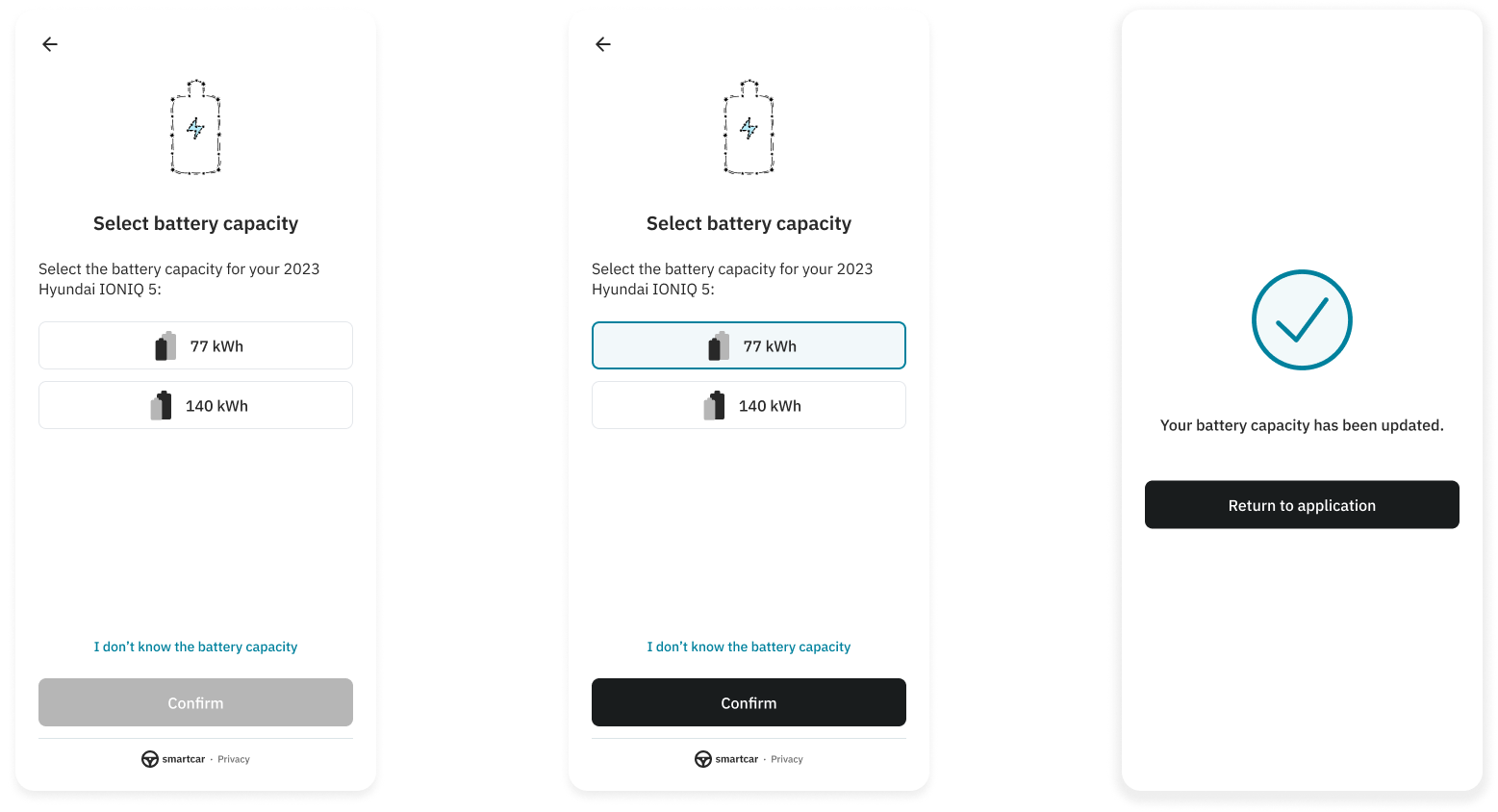 When a user selects an option, Smartcar will return this value with `USER_SELECTED` as the source.
```json Multiple capacities theme={null}
{
"availableCapacities": [
{
"capacity": 70.9,
"description": null
},
{
"capacity": 80.9,
"description": null
},
{
"capacity": 90.9,
"description": "BEV:Extended Range"
}
],
"capacity": {
"nominal": 80.9,
"source": "USER_SELECTED"
},
"url": "https://connect.smartcar.com/battery-capacity?vehicle_id=36ab27d0-fd9d-4455-823a-ce30af709ffc&client_id=8229df9f-91a0-4ff0-a1ae-a1f38ee24d07&token=90abecb6-e7ab-4b85-864a-e1c8bf67f2ad&response_type=vehicle_id&redirect_uri="
}
```
When a user selects an option, Smartcar will return this value with `USER_SELECTED` as the source.
```json Multiple capacities theme={null}
{
"availableCapacities": [
{
"capacity": 70.9,
"description": null
},
{
"capacity": 80.9,
"description": null
},
{
"capacity": 90.9,
"description": "BEV:Extended Range"
}
],
"capacity": {
"nominal": 80.9,
"source": "USER_SELECTED"
},
"url": "https://connect.smartcar.com/battery-capacity?vehicle_id=36ab27d0-fd9d-4455-823a-ce30af709ffc&client_id=8229df9f-91a0-4ff0-a1ae-a1f38ee24d07&token=90abecb6-e7ab-4b85-864a-e1c8bf67f2ad&response_type=vehicle_id&redirect_uri="
}
```